
Machine Timesheet: Approved Daily Records from Meters
End the month-end argument
Reper Axis builds each machine's daily timesheet draft from the meter series, downtime records, transfers and operator assignments. The foreman corrects and approves on screen; the system never overwrites a manually entered day, and an approved day that is changed returns to draft. When every day in the month is approved, the month is locked and cannot be changed later.
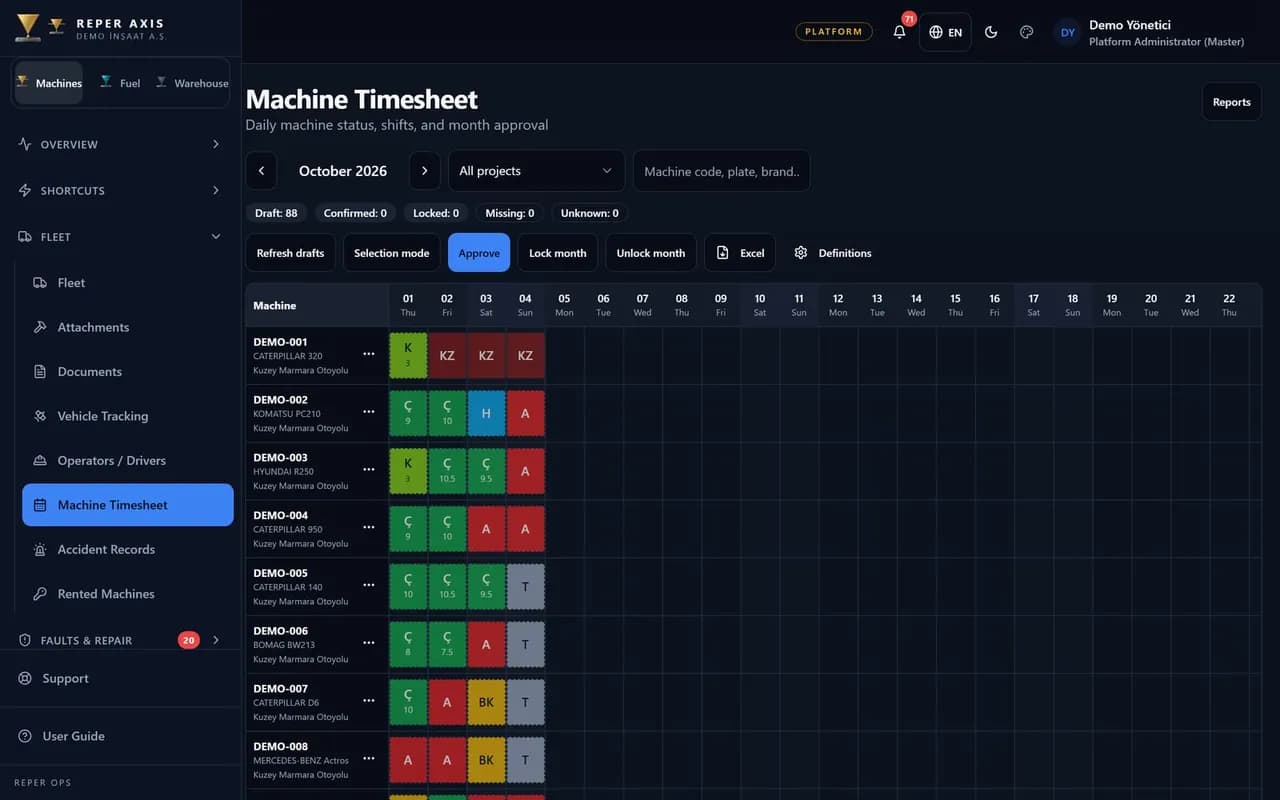
Automatic daily draft
Engine hours come from the meter series, downtime from records, transfers and operators from assignments. Nobody starts from a blank sheet.
Approval and month lock
Entry and approval permissions are separate. When the month ends, if every day is approved the period locks; locked days cannot be edited afterward.
Status codes
Worked, partial work, breakdown, maintenance, accident, standby, weather, haul, holiday and unknown; the tenant can add its own codes.
Day and night shift
The day shift is active and the night shift can be enabled. End-of-shift hours are derived from the meter.
QR entry in the field
The operator reports today and yesterday's shifts by scanning the QR code; without connectivity the entry waits in a device queue.
Excel and signed form
Approved timesheets export to Excel and a signed PDF form; they feed rental billing and project cost.
Where the draft comes from
For each machine and day the system generates a draft first. Engine hours come from the meter series, downtime from downtime records, haul and transfer from movement records, operator from assignment history. Standby days are counted separately so idle machines show clearly in the fleet.
To see the timesheet flow with your own fleet, request a demo account; the demo environment has draft, approval and month-lock steps ready with sample data.
Approval flow and permissions
Roles that enter timesheet data and roles that approve are separate. The foreman can adjust lines; if an approved day is changed again it reverts to draft. At month end the month does not lock until every day is approved.
Utilisation KPI and related modules
When approved timesheet data exists, the utilisation KPI uses expected working days as the denominator, not calendar days; holiday, standby and haul days are excluded. Approved timesheet is the basis for rental billing and project cost; meter discipline is shared with meter tracking.
Who it is for
Site foremen, equipment managers and billing teams who want to end month-end day disputes, base rental billing on timesheet and collect shift reports from the field.
- 1
Draft is built
Meter, downtime, transfer and operator data feed the daily draft.
- 2
Foreman adjusts and approves
Authorised users review days, correct if needed and approve.
- 3
Month locks
When all days are approved the month locks; billing and cost read from this record.
FAQ
Does the system erase a manually entered day
No. Automatic draft never overwrites a manual day; if an approved day is edited it returns to draft and needs approval again.
Is a shift report lost offline
The entry is queued on the device and sent when connectivity returns. Pending entries are visible on the timesheet screen.