
Operator Management: Licence Expiry, Assignments and Performance
Who operated the machine, and is their licence valid
Operators are assigned to machines and the assignment history is kept with its dates. Expiry dates for operator licences, driver certificates, psychotechnical reports and safety training are monitored, and approaching deadlines appear on the dashboard and in notifications. Faults and inspections are linked to the operator, and performance is reported.
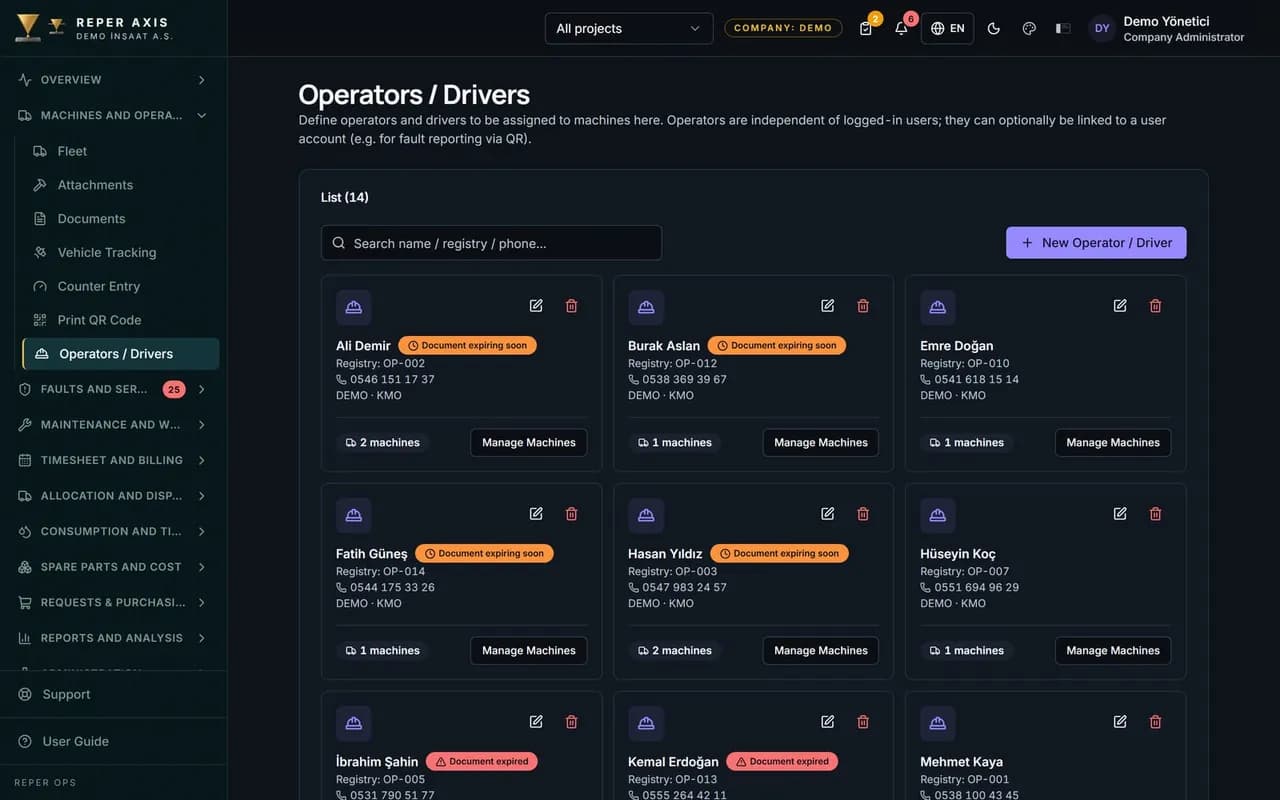

Licence expiry alerts
A notification reaches the responsible manager 30 days before an operator licence, driver certificate, psychotechnical report or safety certificate expires. The risk of operating with an invalid licence drops.

Assignment history
Which operator ran which machine on which dates is stored. You can see retrospectively whose shift a fault was opened on.

Performance indicators
Fault frequency and checklist completion rate are tracked per operator. Team members who need training are identified from data, not opinion.

Automatic matching in the field
Records opened through a QR code are matched to the signed-in user. The operator can also be selected explicitly on the fault form.

Leavers stay in the archive
Past assignments and records of an operator who leaves the company are never deleted. The chain in the machine record is not broken.
How it works
- 1
Define the operators
Identity details and certificates are recorded with expiry dates.
- 2
Assign to a machine
The operator is assigned and the dates are written into history.
- 3
Work in the field
Inspections, faults and fuel entries are linked to the operator.
- 4
Report
Licence deadlines, fault frequency and checklist completion are tracked.
How operator management software works in the field and the office
The fleet or HR officer opens the Operators page from the Fleet menu and records the operator with full name, personnel number, phone and project. An existing user account can be linked to the operator if required, so faults, meter readings and fuel entries opened via QR in the field are matched automatically to the signed-in user. In the Assign to Machine step on the operator detail page, a machine and a start date are chosen; primary and backup operators are assigned per shift; only one primary operator is allowed per shift on a machine.
On the Documents tab, types such as driving licence, driver certificate, psychotechnical report, operator licence and safety training certificate are selected, the file is uploaded and an expiry date is entered. Operators do nothing extra for their own account in the field; the relevant person can be picked from the Operator field on the fault form, and that choice feeds the performance calculation.
What the manager sees
Badges and notifications are generated 30, 7 and 0 days before a document expires, and the expiring operator licences card on the dashboard shows every operator's approaching deadlines in one list. Notifications go to users with the Manage Operators permission. The Assignment History tab records which operator ran which machine between which dates, so you can see retrospectively whose period a fault was opened in.
The Performance tab shows the number of faults, operating hours and faults per 100 hours for the periods the operator was assigned. That value is calculated by dividing the number of faults opened during the assigned periods by the total operating hours in the same periods and multiplying by 100. To compare operators side by side, use the Operator Report under Reports. That value depends on machine age, work type and site conditions; it is a comparison starting point, not a performance grade on its own.
How it connects to other modules
The operator record links to faults, inspections, meter entries and fuel refuelling, and the checklist completion rate also feeds operator performance. Shift reporting and timesheet approval connect through the machine timesheet module. Past assignments and records of an operator who leaves are never deleted, so the chain in the machine record stays unbroken. Licence alerts are delivered from the notification centre by email or in-app.
Who it suits
It suits site supervisors, HSE officers and HR teams who employ many operators and drivers, must prove licence validity during audits and need to know who worked on each machine. Adding and editing on the operator page requires the Manage Operators permission. For an operator to report faults from the field, it is enough that they are linked to a user account and assigned to the relevant machines; no separate app installation is needed.
FAQ
Will I be warned before a licence expires
Yes. A notification goes to the responsible manager 30 days before expiry and approaching deadlines are listed on the dashboard. The daily scan runs every morning.
How is operator performance measured
Fault frequency on the machines an operator ran is reported alongside their checklist completion rate. The figures are always read together with the assignment history.


Ready to digitize your equipment fleet?
Take the first step toward a more efficient, more controlled and more profitable operation.