
Is the machine on the right site? One flow from allocation to dispatch
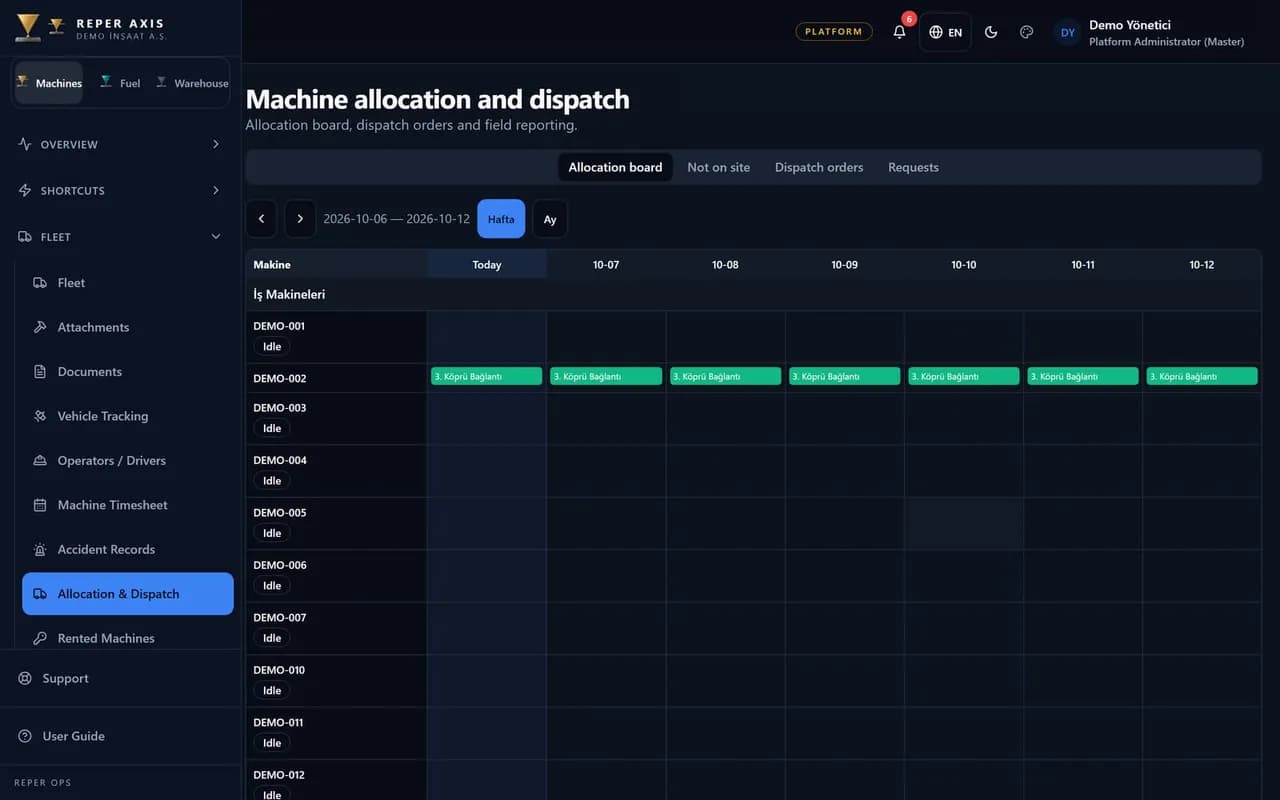
Where a machine should be is compared with where it actually stands, on a single screen. When they differ, a dispatch is planned and the driver closes it from the field on their phone.
How the work flows on site
Allocation
Machine, project and date range are set with an allocation record.
Out-of-place list
Machines whose allocation and current location differ show up in the list.
Dispatch order
The planner picks the machine, destination, date and transport vehicle.
Loading and unloading
The driver reports loaded and unloaded from the machine’s QR code.
Modules in this capability
Machine Allocation and Dispatch
Where it should be, where it is

Allocation calendar
Define machine, project, location and optional unit for a date range. Overlapping allocations on the same machine are rejected; rental end, maintenance due and open accidents show as warnings.
Allocation requests
Site supervisors request quantity and dates. Planners approve by creating allocations or reject with a reason; there is no multi-step approval chain.

Not-on-site list
When the allocated project differs from the machine's current location, the machine is listed for dispatch planning.


Let’s look at it with your machines
Tell us about your fleet and we will show this capability in your scenario.