
Maintenance and Fault Alerts: Email and In-App to the Right Person
The right person, at the right moment
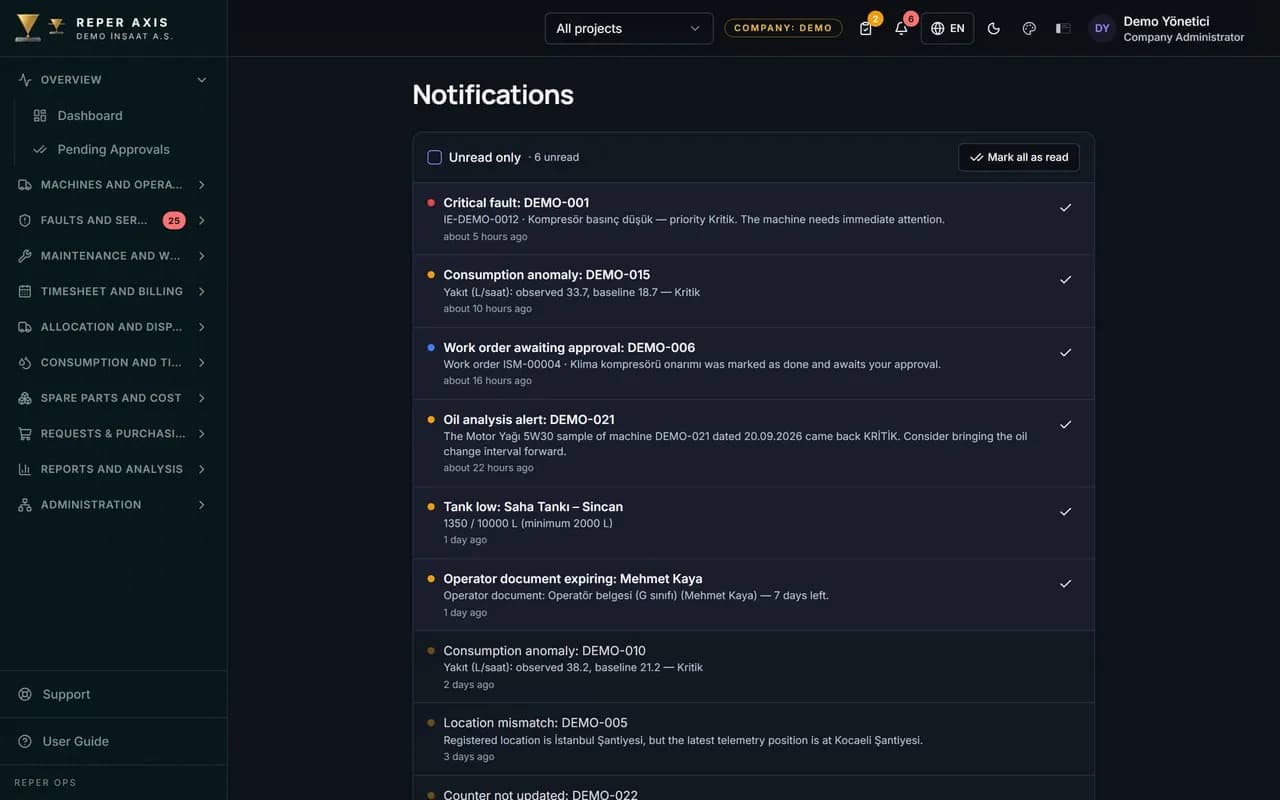
Fifteen different event types are monitored, including critical faults, work orders awaiting approval, expiring documents, contracts and warranties, low stock, fuel deviations, consumption anomalies, critical oil analysis results, location mismatches, missing meter readings and account requests. Notifications are delivered through the in-app bell and by email. Every user decides which event reaches them on which channel.
Preferences per event
Users choose event type by event type which notifications they receive. No unnecessary notification load builds up.
Channel selection
The in-app bell and email channels are switched on and off independently. Email is sent instantly or as a daily digest.
A daily scan every morning
Expiring deadlines and delays are scanned automatically every morning. Document and contract expiries never slip through.
One click to the linked record
A notification takes you straight to the related fault, work order or part page. There is no need to hunt for the record in the menu.
Targeting by role
Critical faults go to the maintenance manager and site supervisor, low stock to the warehouse and purchasing. Notifications never reach the wrong person.
How it works
- 1
Set your preferences
Choose event types and channels from the notification centre.
- 2
An event occurs
A critical fault, low stock or expiring document is triggered in the system.
- 3
The notification goes out
It reaches the right person by bell and email, opening the linked record.
How maintenance and fault alerts reach the right people
When an event occurs, Reper Ops determines the relevant users by scope and permission: critical faults go to the maintenance manager and site supervisor, low stock to the warehouse and purchasing, and operator licence warnings to holders of the Manage Operators permission. The same event can reach several people, and each user sets their own channel. The bell icon in the top bar shows the unread count; clicking it lists recent notifications, and clicking a notification opens the related fault, work order or part record.
The Notifications page has read and unread filters plus a Mark all as read button, so the list is cleared in one move.
Which events are monitored
The fault and work order group covers critical faults, work orders awaiting approval, approved or rejected, and upcoming or overdue work orders. The deadline group monitors expiring documents, contracts, warranties and operator licences. The field data group includes missing meter readings, location mismatches, low stock and account requests. The fuel and analysis group covers fuel deviations, low tank levels, consumption anomalies and oil analysis warnings. Time-based alerts are produced by the daily scan that runs every morning.
The user's own preferences
In the Notification Preferences section of the profile page, a channel is chosen for each event type: in-app, instant email, daily digest or off. Types set to daily digest are gathered into a single email once a day, which is ideal for high-volume events. Preferences apply only to the user's own account. Types such as critical faults can be switched off, though we recommend making sure the team is informed through another channel first.
How it connects to other modules and who it suits
The notification module produces no events of its own; it carries triggers from the fault, work order, contract, operator, warehouse, meter, fuel, analytics and oil analysis modules. When an operator opens a critical fault via QR in the field, the record appears in the maintenance manager's bell and inbox at the same moment; the warehouse officer sees the part that dropped below minimum stock while purchasing receives the same notification on their own channel. Work orders awaiting approval also reach the responsible person, so pending work never escapes attention.
It suits maintenance managers, site supervisors and fleet managers who want to stay informed without visiting the site. In large fleets producing many events per day, the daily digest option reduces the notification load to a single email.
FAQ
Will I be flooded with notifications
No. Event types can be switched on and off individually and email can be set to a daily digest. Notifications are also targeted by role and scope.
Which channels do notifications arrive on
The in-app bell and email channels are available.


Ready to digitize your equipment fleet?
Take the first step toward a more efficient, more controlled and more profitable operation.