
Accident Records: QR Field Report and Downtime Link
Accident days visible in timesheet
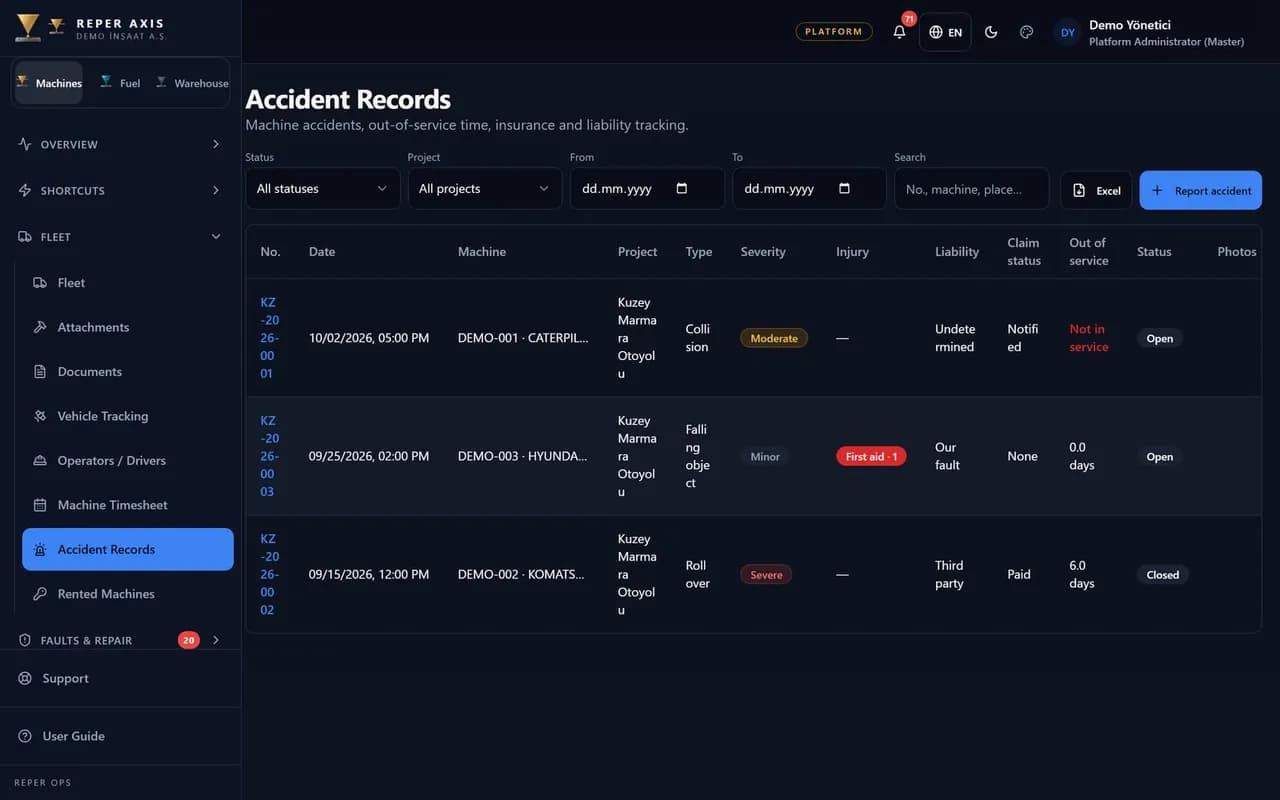
When an accident happens on site, the operator or foreman opens a record by scanning the QR code: date, place, machine, damage, injury level and photos. Without connectivity the record queues; photos can follow later. Each record gets a sequential year-based number. If the machine cannot operate, downtime opens automatically; accident days show separately on the timesheet.
Fast QR opening
Operator or foreman scans the machine tag; the form opens with the machine selected for date, place and damage.
Sequential accident number
Each record receives KZ-YYYY-NNNN per year; archive and insurance files share one reference.
Attachments together
Scene photos, expert reports, minutes, invoices and other documents stay on the same record.
Automatic downtime
When marked non-operable, downtime starts and runs until return to service; an open accident stays as open downtime.
Liability and insurance
Liability can be ours, other party, shared or unknown; policy and claim tracking sit on the same card.
Repair and timesheet link
One click opens a fault for repair. Timesheet shows accident days with a separate code; rental deductions may exclude days when the other party is liable.
Opening a record on site
The operator or foreman scans the machine QR code. Date, place, damage, injury level and scene photos are captured. Without connectivity the record queues on the device; photos can be added after sync.
Downtime and repair
When the machine cannot operate, downtime starts automatically and lasts until return to service. A fault can be opened from the same record for repair; an open accident remains visible as open downtime.
Timesheet, billing and notifications
Timesheet shows accident days with a dedicated status. Rental billing may exclude days from deductions when liability is on the other party. Notifications reach authorised staff immediately; exports are PDF and Excel.
Daily work ties to machine timesheet; field breakdown flow links to fault management.
Who it is for
Site foremen, HSE officers, equipment managers and administration teams who want accidents on record instead of chat messages and paper, with insurance files in one place.
- 1
Report on site
Scan the QR code, add damage, injury level and photos.
- 2
Complete the file
Upload expert report, minutes and invoices; fill liability and insurance fields.
- 3
Close and export
Enter return-to-service date; export PDF and Excel; notifications go to authorised staff.
FAQ
Are injured persons names and medical details stored
No. For privacy compliance only injury level and injured count are stored; personal health data is not kept.
Are field reporting and closing permissions the same
No. Field reporting, editing, liability, insurance and closing are separate role permissions.