
Fault Tracking Software: From Field Report to Closure
Stop losing breakdowns in chat messages
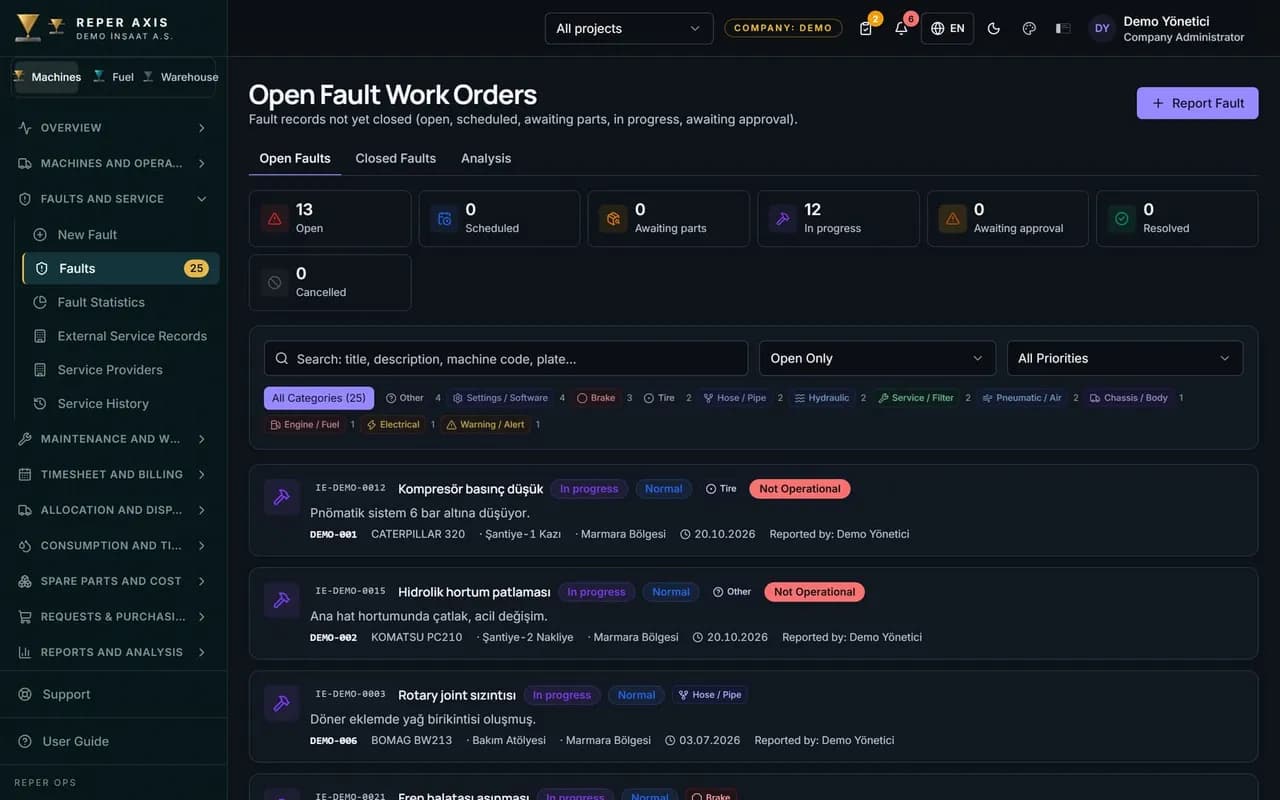
A fault is raised by scanning a QR code on the machine, from a phone or from the desktop, and it is recorded with the category, priority, operability status, photos and the operator on duty. Who reported it, which machine stopped and when it was closed all sit in a single list. Every closed fault is written to the machine's service history and to its cost card.
Reported in seconds with a QR code
The operator scans the QR code on the machine and the form opens with the right machine already selected. Nothing to install, no equipment code to look up.

Automatic downtime on non-operable faults
The moment a machine is marked as non-operable, the downtime clock starts on its own. That downtime feeds straight into the availability calculation.

Warranty checked automatically
When a record is opened on a machine still under warranty, it is flagged with a badge; you use that flag to follow up the warranty claim with the manufacturer.
One click to a work order
A fault that needs repair becomes a corrective work order linked back to it. The workshop runs parts and labor through that same record.

Approval mode set per company
Fault approval can be mandatory, optional or switched off entirely. The process follows the way you work instead of forcing you to follow the software.
Comments and status history
Every status change is stored with who did it and when, and comments build up under the record. Recurring breakdowns become visible in the machine's history.
How it works
- 1
Report from the field
The operator scans the QR code, picks a category and priority, and adds a photo.
- 2
The workshop reviews it
The maintenance lead sees the record and opens a corrective work order if needed.
- 3
The repair is carried out
Parts, labor and external service items are gathered on the work order.
- 4
It closes and is reported
The closed fault is posted to cost, downtime and the machine's service history.
How fault tracking software works on site
A fault can be raised three ways. The operator scans the QR code on the machine and taps Fault on the page that opens; an office user goes to the New Fault page under Faults in the menu; or a failed checklist item creates an inspection-linked fault by itself. The machine arrives pre-selected on the form, and the user enters the fault category, the priority and a description of the problem, attaches a photo if there is one, and selects the operator running the machine.
When the machine is marked as non-operable, the downtime record starts at that moment and ends when the fault is closed or the machine becomes operable again. If the machine's warranty date or warranty hours have not expired, the Under warranty box is ticked automatically. With no connection, the record is queued on the device and the photos are uploaded once the connection returns.
The screens the maintenance team sees
The Open Faults list shows every pending record with the machine, category, priority and date; faults under warranty can be filtered and followed up with the supplier. On the detail page the status is updated, comments are added, the job can be routed to an external service provider, and every status change is written to the History tab with who did it and when.
For a fault that needs repair, the Create Work Order button on the detail page is used; a title, priority and description are entered and the work order is created linked to the fault. A fault cannot be closed while it still has an open work order, and the system shows a warning. Once the work order is completed, the Close Fault step arrives with the dates pre-filled; if the approval mode is mandatory, Send for Approval routes the record to an authorised user and nobody can approve their own record.
How it connects to the other modules
A fault is not a stand-alone record, it is the first link in the chain. The corrective work order opened from a fault carries part reservations, labor hours and the external service amount; when the work order closes, those items are written to the machine's cost card. The downtime created by a non-operable fault feeds the availability, MTBF and MTTR calculations. Faults that repeat in the same category within a short window raise the machine's risk score, and a critical fault is sent as a notification to the maintenance manager and the site manager. The operator selected on the fault form is reflected in the performance figures.
Who it is for
It was designed for teams running heavy equipment and trucks across several job sites who are tired of chasing breakdowns through phone messages and paper forms. The operator only scans a QR code and fills in a few fields; the maintenance team finds the morning list ready; the manager sees the breakdown by category, machine and period on the Statistics page and uses recurring faults as an input to the maintenance plan.
FAQ
Do operators have to install an app on their phone
No, the QR code opens in the browser and a camera is all that is needed. Anyone who wants to can add the page to the phone's home screen and use it like an app.
If there is no connectivity on site, is the fault report lost
The record is queued on the device and sent automatically once the connection returns. The same fault is never created twice while the queue clears.
Can fault approval be made mandatory
Yes, the approval mode is set to mandatory, optional or off in the company settings. Approval rights are also granted by role.


Ready to digitize your equipment fleet?
Take the first step toward a more efficient, more controlled and more profitable operation.