
Machine Record: Warranty, Contracts, Documents and Transfers
Never miss a warranty or contract again
Ownership details, purchase data and the warranty period, expressed as a date or as operating hours, are held on the machine card. Rental, service, insurance and extended warranty contracts are stored with their attached files, and anything nearing expiry raises an alert. Transfers between job sites and document validity all gather in the same record.
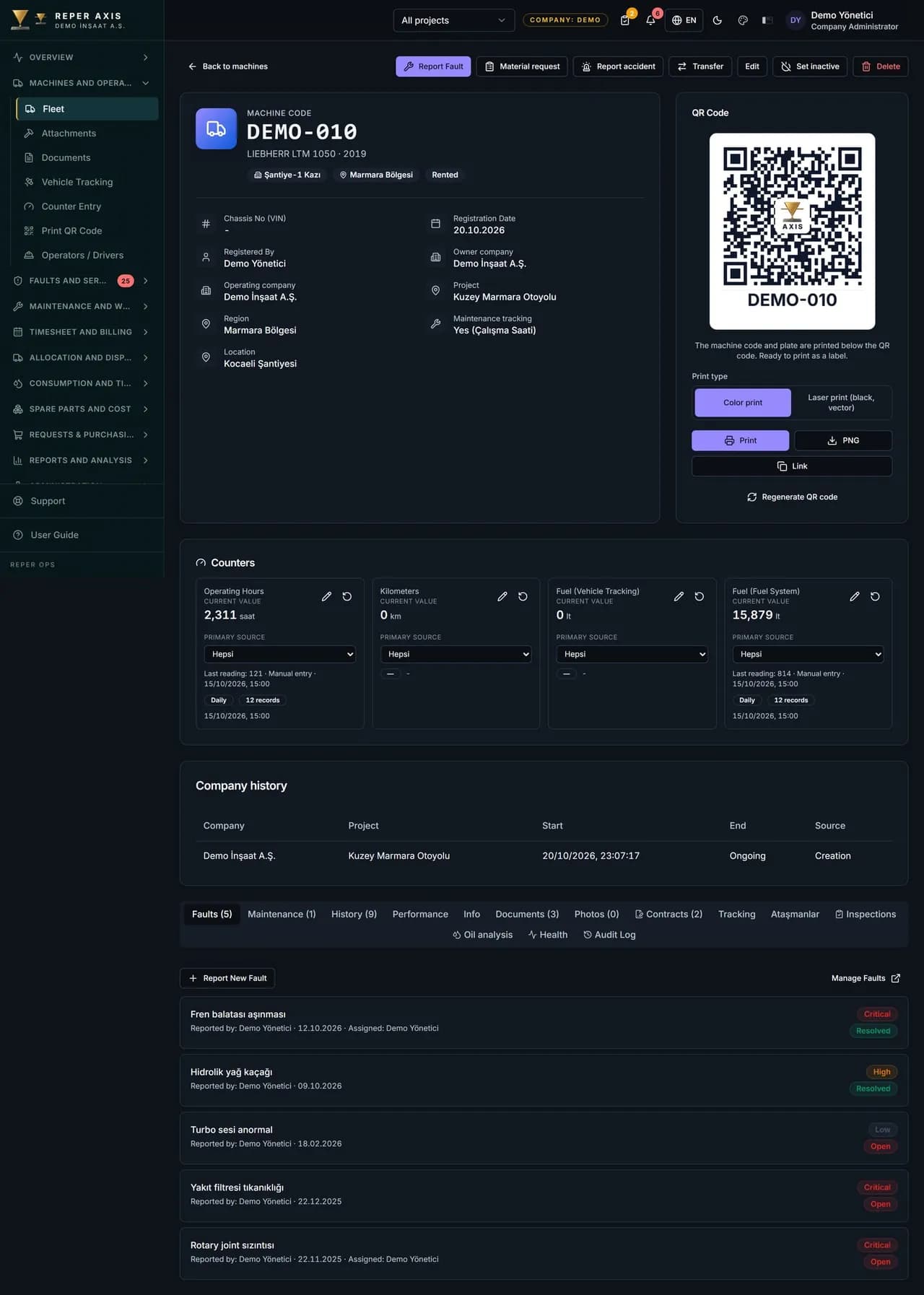

Document access via QR
During a site inspection the machine QR code is scanned to view registration, insurance, inspection certificates and other documents. Nobody has to drive back to the office for paperwork.

Automatic warranty check
When a record is opened on a machine still under warranty, it is flagged with a badge; you use that flag to follow up the warranty claim with the manufacturer.

Contract expiry alerts
A notification goes out 30 days before rental, service, insurance and extended warranty contracts expire. Rented machines do not sit idle on the clock.

Job site transfer log
Origin and destination site, haulage cost and duration are recorded. Transfer time feeds through to the availability calculation as downtime.

Location and site boundary
Coordinates and a radius can be defined for each location. When the telemetry position leaves the registered site, a location mismatch alert is raised.

History that survives handovers
Transfers, operator assignments and record changes are stored with who and when. When the responsible person changes, the machine history stays put.
How it works
- 1
Complete the identity
Enter ownership, purchase and warranty details on the machine card.
- 2
Upload the documents
Contracts and documents are stored together with their expiry dates.
- 3
Deadlines are watched
Warranties, contracts and documents nearing expiry raise alerts.
- 4
Movements are logged
Transfers and assignments are written to the record, history stays unbroken.
What the machine record is and who enters what
The machine record is the section of the machine card where ownership, purchase, warranty, contract, document and movement data come together. In the Purchase and Warranty part of the machine form the fleet manager sets the ownership type as Owned, Rented or Leased and enters the purchase date, amount and supplier. Warranty expiry can be defined as both a date and an operating hour limit; whichever is reached first ends the warranty.
On the Contracts tab, rental, service, insurance, extended warranty and other contract types are saved with start and end dates, amount, unit and counterparty; the contract file is attached as a PDF or an image. Documents such as registration, insurance, statutory inspection and certificates are uploaded from the Documents tab with an expiry date.
QR-based document and warranty checks in the field
During a site inspection, scanning the machine QR code opens a screen with a View Documents shortcut, so nobody has to return to the office to find a registration or insurance certificate. When a fault form is opened, the system checks whether the machine is still within its warranty date or hour limit and ticks the Under warranty box automatically. Warranty-covered faults can then be filtered in the list and pursued with the supplier.
Alerts and history the manager sees
The dashboard card for expiring contracts and warranties lists everything ending within 30 days, and the same information is delivered as a notification. When a contract is renewed the old record is not deleted; it remains as history while the badge updates to reflect the new contract. Transfers between job sites are recorded with the Transfer button along with destination, date, haulage cost and a note, and the Record tab shows transfer history in chronological order.
Once coordinates and a radius are defined for a location, machines whose telemetry position leaves the registered site generate a location mismatch card and notification. Operator assignments and record changes are stored with who and when, so history stays intact even when the responsible person changes.
How it connects to other modules and who it suits
The amount on a rental contract flows automatically into the rental column of the cost report, and haulage expense into the transfer column; transfer time enters the availability calculation as downtime. Leasing is held for information only and is not recorded to cost. It suits companies with many rented and leased machines, those keeping contract calendars in spreadsheets and those asked for documents in the field. Finance, the fleet manager and the site supervisor all look at the same record, so nobody has to chase paperwork from anyone else.
FAQ
Can the warranty period be tracked in operating hours
Yes. A warranty can be defined by both date and operating hours. Whichever limit is reached first determines the warranty status.
Where is the transfer cost recorded
Haulage expense is recorded to the machine cost card as a transfer item. Transfer time is also reflected as downtime in the availability report.


Ready to digitize your equipment fleet?
Take the first step toward a more efficient, more controlled and more profitable operation.