
Preventive Maintenance Software: Hour Meter and Calendar Triggers
The work order is ready before the service is due
Maintenance programs are defined by make and model, at intervals such as 250 hours, 500 hours or 6 months. The trigger mode can be the hour meter, the calendar or both, and the work order is created as soon as the first threshold is reached. The maintenance dashboard separates overdue, upcoming and scheduled items with colour-coded badges.
Dual-trigger programs
Engine hours and the calendar interval are defined in the same program, and the service falls due when the first of them is reached. Even a low-utilisation machine is serviced on time.
You set the warning threshold
The company decides how many days or hours ahead of the service date it wants to be warned. That leaves lead time for parts and workshop planning.

Maintenance parts list
Program items are linked to the part cards in the warehouse. When the work order is opened, the required filters and oils are already listed.
Automatic meter readings from telemetry
On connected machines the engine hours arrive from telemetry with no manual entry. As the meter updates, the maintenance triggers are recalculated by themselves.

Bulk assignment to a group
A program is applied to a whole machine group in a single action. When a newly acquired machine joins the group, it inherits the same maintenance regime.
How it works
- 1
Define the program
Enter the intervals, trigger mode and part items by make and model.
- 2
Apply it to machines
Assign the program to a single machine or to an entire machine group.
- 3
The meter runs
Telemetry, field entries and bulk entries all feed the same meter history.
- 4
The work order drops
When the threshold is reached a preventive work order is created for the workshop.
How a maintenance program is defined
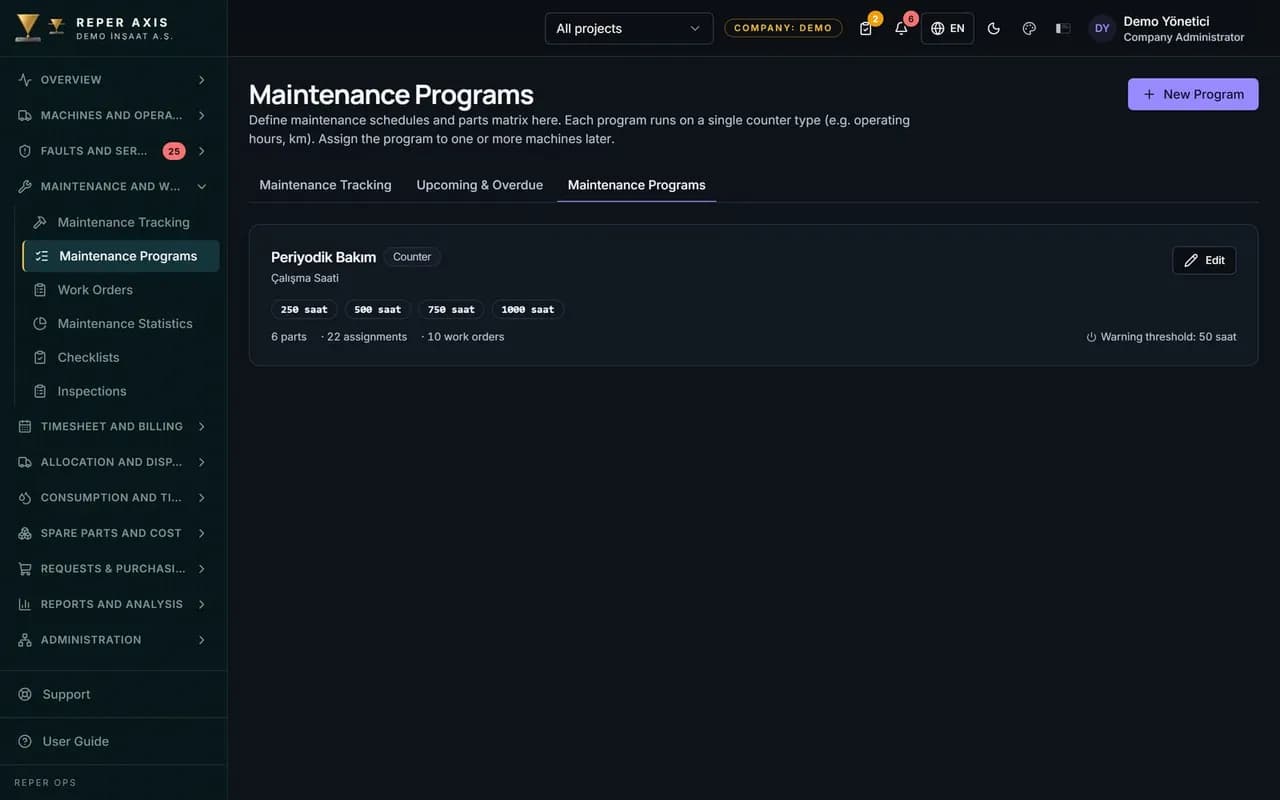
New Program is opened on the Maintenance Programs page under the Maintenance menu; the program name and the machine group it belongs to are selected. Maintenance intervals are entered in engine hours, for example 250, 500 and 1000 hour stages. The jobs to be carried out and the materials to be used at each stage are defined as a parts matrix, and the part items are linked to the part cards in the warehouse.
In the trigger type field, Hour meter, Calendar in months or Both is selected; when Both is chosen, the service falls due as soon as the first condition is met. The warning days field sets how many days before the service you are notified, with a default of 15 days. A machine can be assigned more than one program, for example engine maintenance and hydraulic maintenance running as separate programs.
Assignment to machines and the flow of the meter
On the Assignment page under the Maintenance menu, the machine and the program to apply are selected, the starting meter value is confirmed and the system calculates the next service targets. A program can be applied to a whole machine group in a single action. The targets are based on the machine's current meter reading, which arrives automatically from telemetry, from the field by QR code, or in bulk from the Meter Entry screen in the office. The Missing Maintenance page under Checklists lists machines with no program assigned and lets you assign one directly from the row.
What the manager sees on the maintenance dashboard
The Maintenance Dashboard lists upcoming and overdue services; each row shows the machine's current meter reading, the target reading and the hours remaining, with overdue services highlighted in red. The Create Work Order button on the row opens a preventive work order pre-filled with the job and material list from the program; when the threshold is reached, that work order is also created by itself and drops into the Open Work Orders list. On the work order, the trigger label shows whether the hour meter or the calendar fired it. Upcoming service and overdue notifications go to the responsible user, and the same summary appears on the management dashboard.
How it connects to the other modules
Preventive maintenance is the main feeder of the work order module; because program items are linked to warehouse part cards, parts are reserved as soon as the work order is opened. A closed maintenance work order writes labor and part cost to the machine, and the maintenance downtime feeds the availability calculation. Overdue maintenance is one of the components of the risk score, and a machine with a rising score moves to the top of the dashboard. The structure suits fleets that want a standard service ladder by make and model, and job sites that need the calendar trigger for low-utilisation machines.
FAQ
If meter data is entered irregularly, will a service be missed
The calendar trigger covers that risk; even if the meter lags, the service falls due once the period is up. Notifications are also raised for machines with no meter reading for a long time.
How do I see overdue maintenance
The maintenance dashboard lists overdue, upcoming and scheduled items separately and marks them with colour-coded badges. The same summary also appears on the management dashboard.


Ready to digitize your equipment fleet?
Take the first step toward a more efficient, more controlled and more profitable operation.