Why one number never explains maintenance cost
In most yards the question of how to calculate heavy equipment maintenance cost is answered with a year end accounting total. That total may be correct, but it never shows which machine is swallowing the money.
A useful calculation separates three things: the cost items, the machine the cost belongs to, and the project it belongs to. Held together, the same data serves the workshop, finance and the rent or buy decision.
This guide defines the items, explains the allocation logic, and describes the data you need for cost per hour and for comparing rental with ownership.
Cost items: labour, parts, outsourced service and other
Maintenance cost has four main items. Separating them at the outset is far cheaper than hunting later for which expense belonged to which job.
The ratio between items shifts with machine type, age and operating conditions. What matters is that every job can be booked under all four; a missing item understates maintenance and operating cost and leads to a wrong decision.
- Labour: the hours your own crew spends multiplied by the hourly rate, which may differ by project and should include wages, social costs and overhead.
- Parts and consumables: filters, oil, grease, hoses, bucket teeth. Stock issues should be valued with a consistent method such as weighted average.
- Outsourced service: invoiced amounts for dealer work, mobile service, welding and machining bought from outside.
- Other items: haulage and lowbed transport, hired equipment, travel to site and any portion left outside warranty.
Allocating cost to machines and projects
Every expense must be written against a machine. Without machine level records you cannot tell which unit has reached the end of its economic life, or which model is turning out more expensive.
The second dimension is the project. A machine may work on several sites in a year, and booking maintenance to the project it served keeps project profitability honest. Transfer haulage enters as its own item.
The easiest allocation is to record the expense where it arises. When a work order closes, machine and project are already known, so labour, parts and service written at that moment need no later distribution.
How to find maintenance cost per hour
A total expense figure misleads, because a machine that works more naturally receives more maintenance. For a fair comparison, divide cost by working hours.
In plain words: maintenance cost per hour equals total maintenance expense in the period divided by working hours in the same period. Use the last 12 months or the last 1000 hours; shorter windows break on one big repair.
This depends on reliable meter data. Erratic entry makes the divisor wrong and the hourly figure meaningless. Telemetry supplies hours automatically; without it, regular field entry and a missing meter alert close the gap.
- Compare machines of the same group and similar age on cost per hour; the outlier is waiting to be investigated.
- Cost per hour climbs with age, and the speed of that climb signals the end of economic life.
- Flag warranty work separately, or a new machine will look more expensive than it really is.
Data you need to compare renting with owning
Without data the rent or buy decision is instinct. A sound comparison sets the owned machine's cost per hour, fuel, depreciation share and downtime loss against the monthly rental fee and everything that fee excludes.
Maintenance is the critical input, because on a hired machine most of it stays with the lessor. If the owned machine's real maintenance expense is unknown, the comparison comes out wrong in one direction or the other.
Rental fees belong in the same cost table under a rental item. Then hired and owned machines on a project are read in one report and the next decision rests on data.
Common mistakes
Costing errors usually come from discipline rather than method. The most frequent ones are listed below.
- Entering cost on a separate screen days after the job: the figures end up incomplete and rounded.
- Not counting labour at all, so your own hours look free and outsourced service looks expensive.
- Valuing parts at the last purchase price, which makes cost jump; weighted average is steadier.
- Forgetting haulage, lowbed and transfer expense, a serious item in multi site operations.
- Leaving cost figures open to everyone instead of separating them with permissions.
How Reper Axis does this
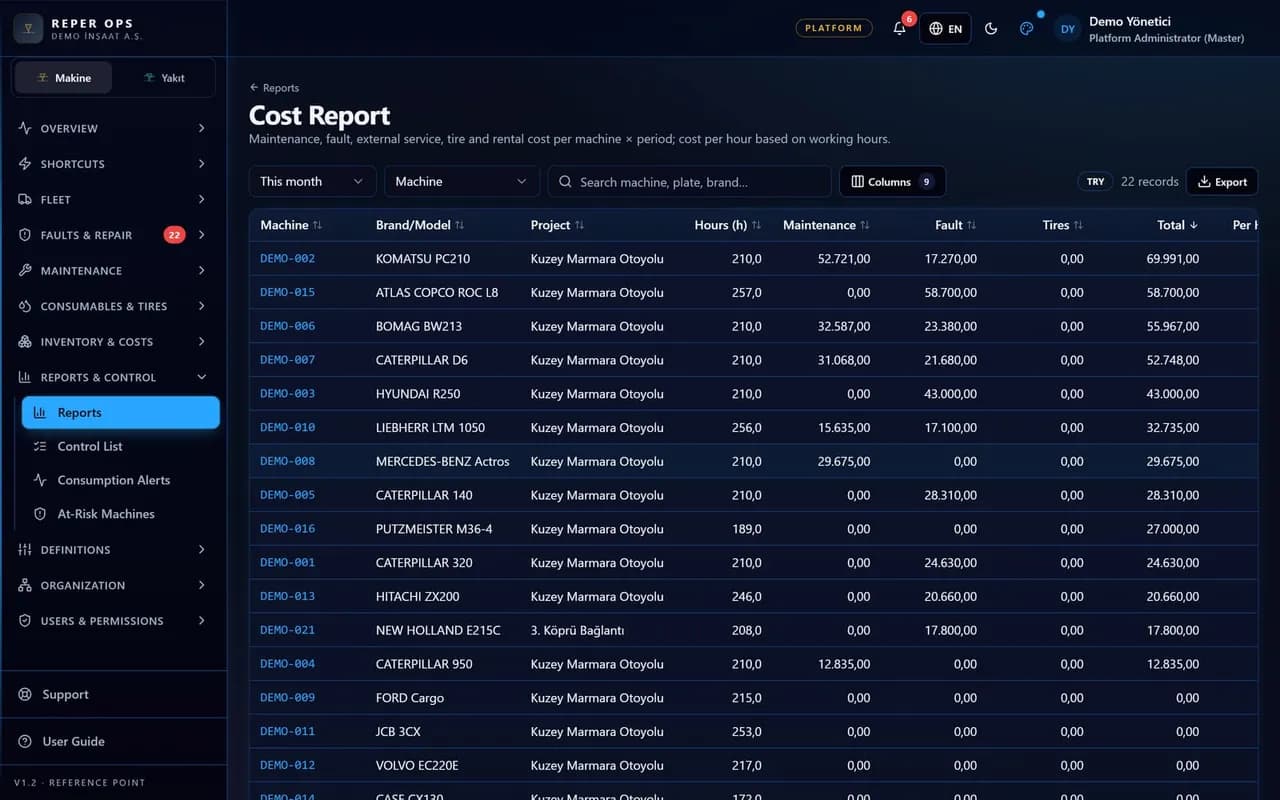
Reper Axis does not treat cost as a separate data entry. When a work order closes, labour hours are multiplied by the project rate, reserved parts are consumed at weighted average cost, and outsourced service joins the same card. Rental fees and transfer expenses post there too.
Results are reported by project, machine and month, split into maintenance, breakdown, rental and transfer. Currency can be set per project as EUR, USD or TRY. Viewing cost and editing it are separate permissions, and warranty status is checked automatically when a fault is opened.