
Equipment Maintenance Cost Tracking: Labor, Parts and Service
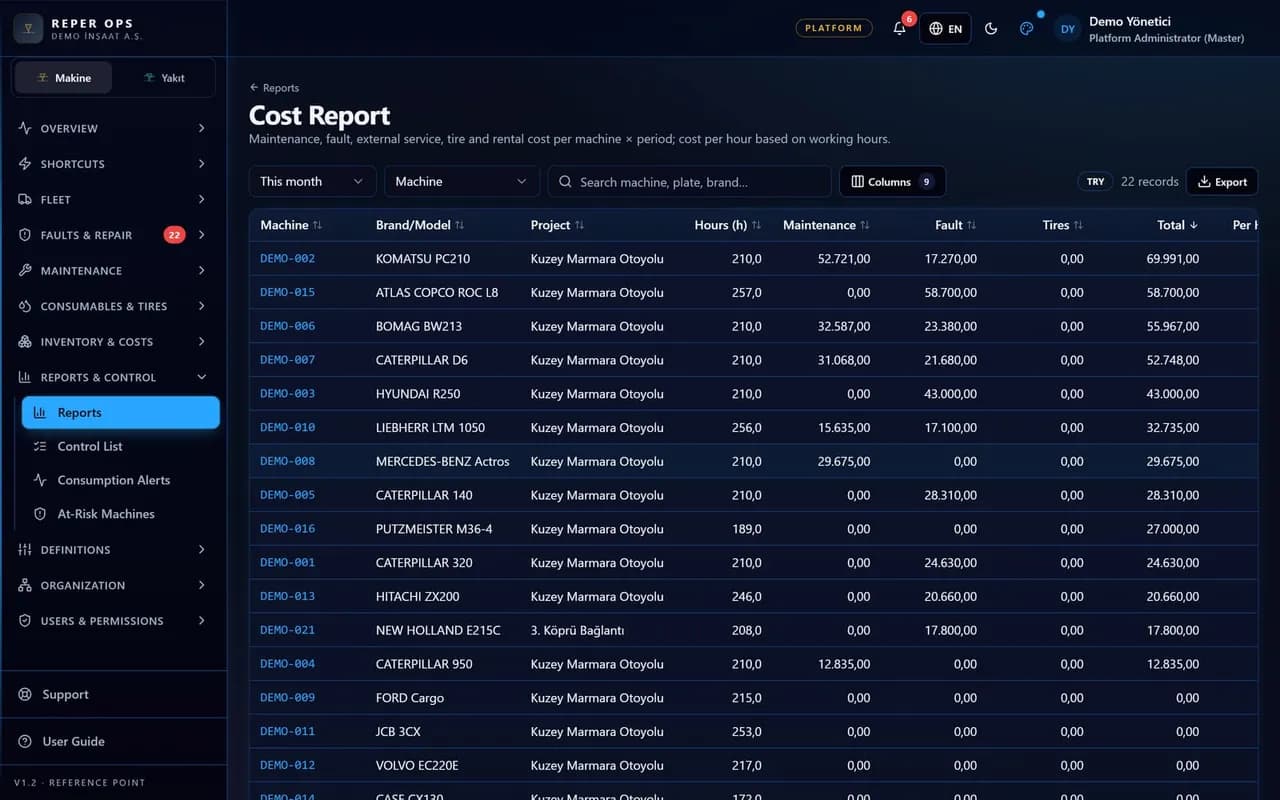
Maintenance and operating cost per machine
Cost is not a separate data entry exercise: when a work order closes, labor hours are multiplied by the rate and the parts used and external service invoices are posted to the machine. Rental charges and site transfer expenses go on the same card. The result is reported by project, machine and month.

Project-based labor rates
The hourly labor rate is defined per project and multiplied by the work order hours. Different sites can run on different rates.

Breakdown by source
Spend is split into maintenance, faults, rental and transfer. Where the money went is visible at a glance.
Multiple currencies
EUR, USD and TRY can be selected per project. Overseas projects run inside the same structure.

Separate, fine-grained permissions
Viewing and editing cost are granted independently of each other. Field teams can work without seeing the cost figures.
Rented versus owned comparison
The rental charge and the maintenance spend on an owned machine appear in the same report. The rental decision is made on data, not on instinct.
How it works
- 1
Enter the rates
Define the project-based labor rate and the currency settings.
- 2
Let operations run
Work orders, faults, fuel and rental records follow their normal flow.
- 3
Cost accumulates
Every closed record posts labor, parts and external service to the machine.
- 4
Read the report
Review the cost breakdown by project, machine and month.
How equipment maintenance cost tracking is set up
There is no separate data entry screen for cost; setup starts with two definitions. On the Hourly Rates page under the Warehouse and Cost menu, New Rate is used to enter the project, the effective start date and the hourly rate; if there is no project-specific rate, the general rate applies, and changing a rate does not affect existing work orders. On the Settings page under the Access menu, the default currency is set to EUR, USD or TRY; a project using a different currency overrides that value on its own card.
The cost card is only visible to users with the View Cost permission, and the Edit Cost permission is required as well in order to change it. Field teams can work without seeing the figures.
Where cost accumulates
The same Cost card appears on both the work order and the fault detail. Labor hours are entered, the hourly rate arrives automatically based on the project and date, and it can be overridden by hand if needed. The parts cost is calculated from the unit price times quantity total of the part lines on the work order and cannot be edited by hand; the consumption price is the weighted average cost in the warehouse. Invoice amounts are written into the External Service and Other fields, and the total updates instantly. On rented machines, the daily or monthly amount from the rental contract flows into the rental column, the haulage cost from a machine transfer into the transfer column, and fuel transactions into the fuel column, all by themselves.
The report the manager reads
On the Cost Report page under the Warehouse and Cost menu, the date range, project and machine group filters are selected. The table shows the total per machine along with the labor, parts, external service, other, rental, transfer and fuel breakdown; clicking a row opens the related work order and fault list for that machine. The report is downloaded as Excel and every export is written to the audit trail. A user only sees the cost of the projects within their scope, so a site manager's report never reaches beyond their own project. Cost summaries appear as compact cards on the management dashboard.
How it connects to the other modules and who it is for
The cost module is the outcome of operations: a fault becomes a work order, the work order becomes part consumption and labor hours, and those become machine cost. The rental contract comes from the machine record, the fuel expense from the fuel module and the transfer expense from the location module. The maintenance spend on an owned machine sits side by side with the rental charge on a hired one, so the rental decision is made on data. Depreciation, financing, insurance and overhead allocation are not in this calculation; currency conversion is not performed. For rental period billing and project cost allocation see rental billing and project cost. It suits construction and mining companies running several projects, applying different labor rates per project and working in a different currency on overseas sites.
FAQ
Is separate data entry needed for cost
No, closing work orders and faults creates the cost by itself. It is enough to set up definitions such as the labor rate and the external service amount.
Can everyone see the cost figures
No, viewing and editing cost are separate permissions granted by role. A user also only sees the cost of the projects within their scope.


Ready to digitize your equipment fleet?
Take the first step toward a more efficient, more controlled and more profitable operation.