
Fuel Management Software: Tanks, Refuelling and Variance Control
From the tank to the machine, litre by litre
Fixed tanks and mobile bowsers are held in inventory; tank deliveries, transfers between tanks and machine fuellings are all recorded. QR entry of litres and meter readings in the field is manual recording; the connection route for automatic writes from pumps and meters is settled during technical discovery. After every transaction the tank level updates instantly, and a notification goes out when it drops below the minimum level. The fuel expense flows straight into the machine cost report.
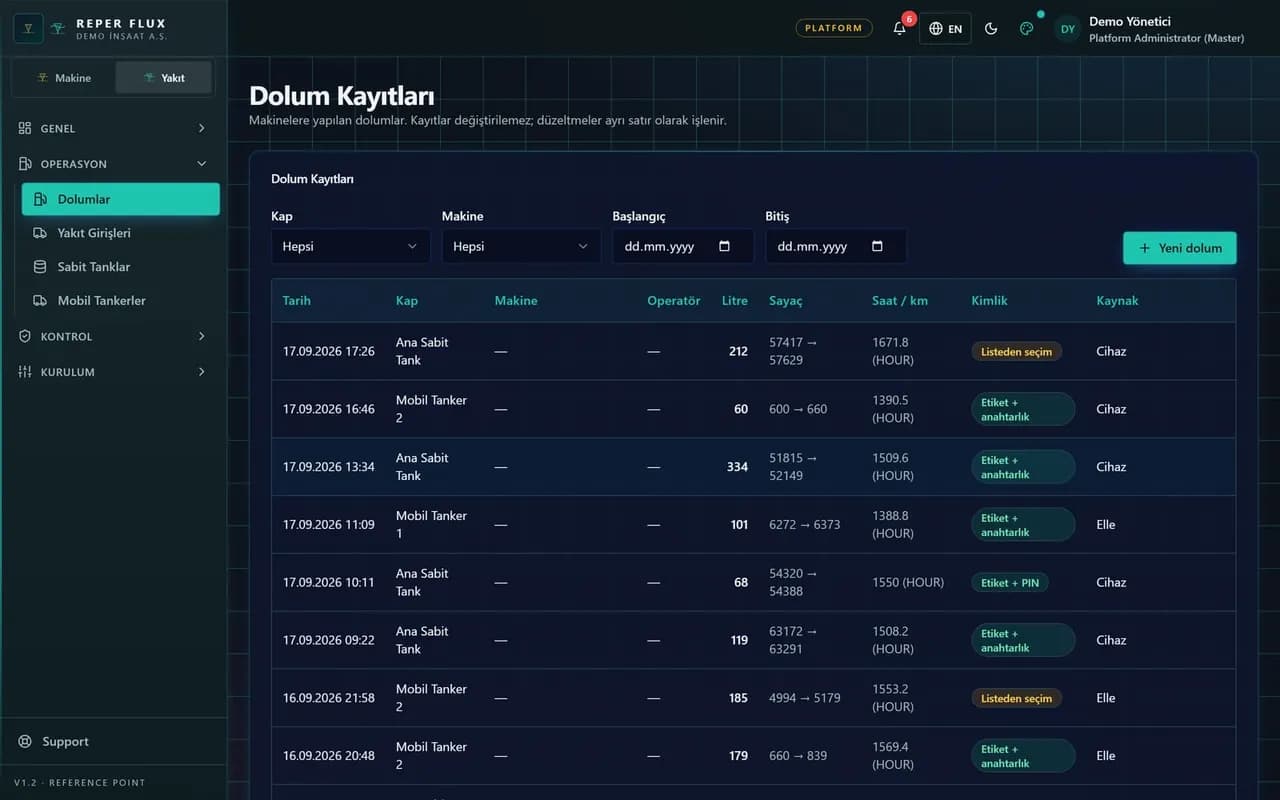

Refuelling logged with a QR code
The operator scans the QR code on the machine, enters the litres and the meter reading, and picks the tank. No paper dockets to collect and reconcile later.

Telemetry reconciliation
Refuelling records are compared with the consumption data coming from telemetry. A warning is raised when the variance threshold is exceeded.

Consumption per hour
Litres per engine hour are tracked per machine and per machine group. A machine deviating from its own history lands on the alert list.

Tank levels and alarms
The balance of fixed tanks and mobile bowsers is updated on every transaction. A notification is sent for any tank below its minimum level.
Pump automation connection
A device API key is defined for pump automation; refuellings are written straight into the system and repeated submissions never create duplicate records.

Flow through to cost
The fuel expense is posted to the machine and project cost report. Fuel, maintenance and parts spend are compared in the same table.
How it works
- 1
Define the tanks
Fixed tanks and mobile bowsers are added to inventory with their capacities.
- 2
Scan on site
The operator records the litres and the current meter reading via QR code.
- 3
See the reconciliation
Refuellings are compared with telemetry consumption and variances listed.
- 4
Post to cost
The fuel expense flows automatically into machine and project reports.
Tanks and transactions in fuel management software
On the Fuel page under the Consumables and Tires menu, a new tank is created from the Tanks tab; the name, code, location or project, capacity, current litres and minimum level are entered. Fixed tanks and mobile bowsers are held in the same inventory. When the current litres fall below the minimum, the tank raises a low level notification.
On the Transactions tab, New transaction is used to select the type: Machine refuelling, Tank delivery or Adjustment. On a machine refuelling the tank and the machine are selected and the litres and unit price are entered; if a meter reading is entered, that value is also added to the machine's meter history as a reading. A tank delivery records the supplier and the litres received, and an adjustment records the count result. The tank level updates instantly on every record.
What the operator does on site
The operator scans the QR code on the machine with a phone and taps Fuel on the page that opens; the quick refuelling form opens with the machine already selected and the litres, tank and current meter reading are entered. There are no paper dockets to collect and no month-end exercise matching dockets to tanks. With no connection, the record is queued on the device and sent once the connection returns. On sites with pump automation, the device is defined on the Devices tab, linked to a tank, and the API key shown only once is written to the device; pump refuellings drop straight into the Transactions list and repeated submissions do not create duplicates.
Reconciliation and variance: what the manager sees
On the Reconciliation tab a date range is selected; for each day the litres issued to the machine, the fuel consumption reported by telemetry and the variance percentage appear side by side. If the Fuel Variance Threshold on the Settings page is exceeded, the row is flagged in red and a fuel variance notification is sent. On a machine with no telemetry the consumption side stays empty and only the litres issued are tracked. The machine's litres per hour over the last 7 days is also compared with its own 90-day history and with its group; the deviation becomes a consumption anomaly alert and appears on the chart in the machine's Health tab. The Fuel page under Checklists lists machines with missing or inconsistent fuel data. Tank level and variance alert cards appear on the dashboard.
How it connects to the other modules and who it is for
The fuel expense flows into the fuel column of the machine and project cost report, and the fuel-per-hour report compares litres per engine hour by machine and by group. The consumption anomaly is the heaviest component of the risk score. The meter reading entered at refuelling feeds the maintenance targets. Permissions are separated: Manage Fuel defines tanks and devices, Fuel Entry records refuellings. It suits job sites distributing fuel from their own tank, fleets refuelling in the field with a mobile bowser, and managers who want to see theft and losses as a number.
FAQ
How are theft and losses spotted
A machine's consumption is compared with its own history and with its group, and a sudden rise becomes an anomaly alert. The variance between the tank balance and total refuellings also shows up in the reconciliation.
Is integration with pump automation possible
For pump automation, refuelling records are sent directly using the API key generated for the device. Even if the same transaction is sent again, no duplicate record is created.


Ready to digitize your equipment fleet?
Take the first step toward a more efficient, more controlled and more profitable operation.