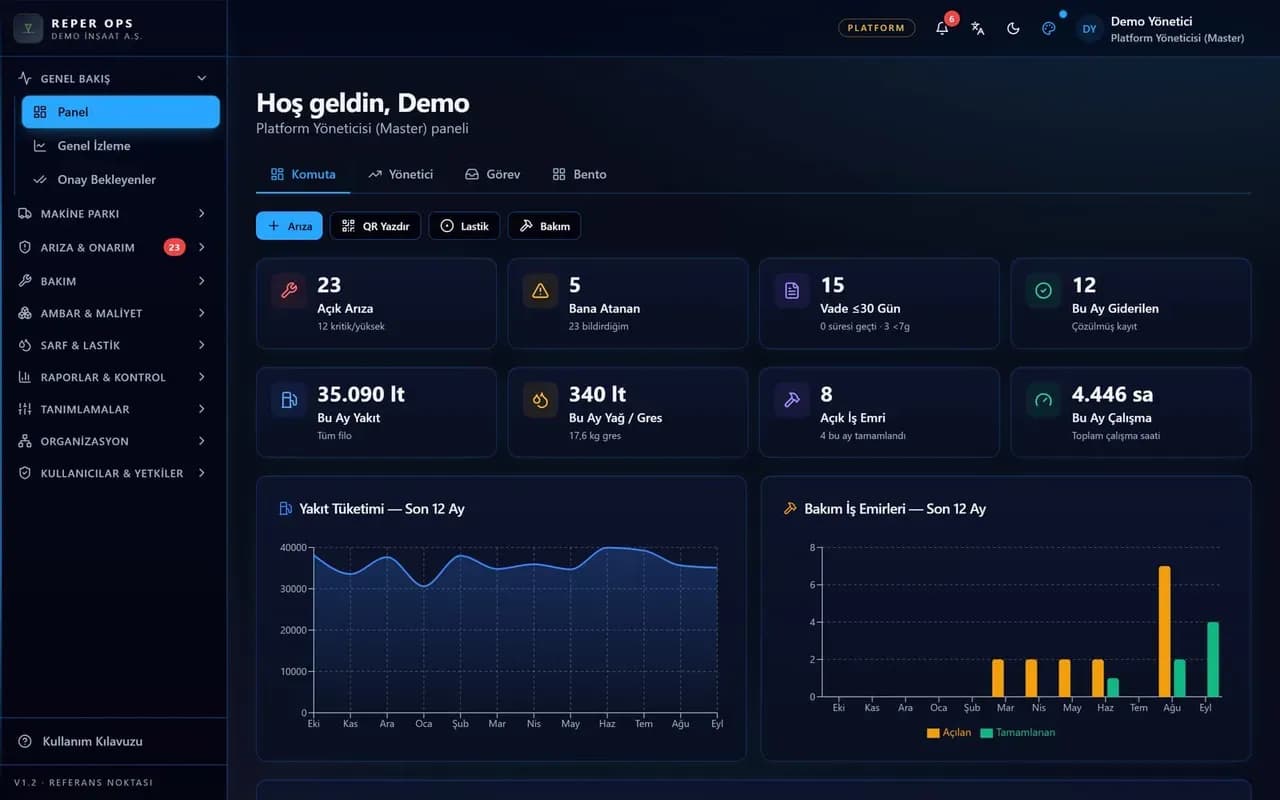
What a CMMS is and how it differs from EAM
The short answer: a CMMS is a computerised maintenance management system that records the maintenance jobs, faults, work orders, spare parts and costs of your assets in one place, taking maintenance out of memory, paper and message groups.
EAM, enterprise asset management, adds the whole asset life cycle on top of that core: purchasing, contracts and warranty, ownership, transfer, performance and disposal. In practice the boundary is blurred, and most modern products combine the two.
In equipment and fleet work the distinction thins further. An excavator's maintenance plan, fault history, warranty, operator, fuel and tires must gather on one machine card, or users hunt the same machine through five separate lists.
Who needs a CMMS and when
As machine numbers and sites grow, maintenance knowledge attaches to people: service dates in the foreman's notebook, faults in message groups, part details in the storekeeper's memory. When one of them leaves, the knowledge leaves too.
Typical stakeholders are the site manager, maintenance manager, workshop foreman, storekeeper, fleet manager and finance. Each expects something different, and a good CMMS brings those roles to the same data through different screens.
No fixed machine count triggers the need. Complexity decides: several sites, several machine groups, a mix of hired and owned units, and more than one person using the same information.
Primary modules a CMMS should cover
The modules below form the core of an equipment and fleet oriented system. You need not switch them all on at once, but the links between them should already exist so a later module lands on existing data.
- Asset register: code, plate, make and model, group, project, location, ownership, warranty, contracts and documents.
- Fault management: field reporting, category, priority, operability, photos, status history and conversion into work orders.
- Work orders: planning preventive and corrective jobs, task lists, labour hours, part usage, approval and closing.
- Preventive maintenance: programmes triggered by meter, calendar or both, with upcoming and overdue work visible.
- Meter tracking: working hours and kilometres collected by telemetry, field entry or bulk import.
- Spare parts and stores: part cards, compatibility, multi warehouse stock, reservations, minimum levels and purchasing.
- Checklists: shift start and periodic inspections filled in the field, with critical items becoming faults.
- Cost and reporting: cost by machine and project, availability, MTBF and MTTR, and export.
- Supporting modules: fuel, tires, oil analysis, operator documents, notifications and the audit trail.
Selection criteria for site conditions
Whether the software can actually be used in your conditions matters as much as the feature list. The criteria below come from site and fleet reality.
- Field use: can an operator report a fault and fill a checklist from a phone by scanning a QR code, with no app install.
- Offline work: when the connection drops, does the record queue on the device and send later without duplicating.
- Multiple sites: can a company, region, project and location hierarchy be built, and are machine transfers recorded.
- Permissions and scope: role based module rights, users limited to their own project, cost visibility granted separately.
- Data isolation and security: is your data kept apart from other customers, how are backups run, is there an audit trail.
- Integration: meter data from telemetry providers, pump automation devices, and export to Excel and PDF.
- Modular licensing: can you open only the modules you need and add more later without clutter.
- Language and currency: support for overseas projects and teams working in another language.
- Setup and migration: can existing machine lists and part cards be imported in bulk, and is help available.
Common mistakes
CMMS projects usually fail through selection and rollout errors rather than missing features.
- Switching everything on at once: ten modules on day one overwhelm the team. Start with faults, work orders and meters.
- Choosing without the field in mind: software that impresses on a desk but is unused on site produces no data.
- Bending your process to the tool: approvals, categories and statuses must follow your own way of working.
- Neglecting meter discipline: maintenance triggers, fuel and availability all rest on meter data.
- Entering cost separately: cost should arise from work order closing, otherwise it is late and incomplete.
- Granting broad permissions: universal edit rights lower data quality and expose sensitive figures.
How Reper Axis does this
Reper Axis keeps machines, trucks, equipment and facilities in one list, runs in the browser and needs no installation. In the field it is added to the phone home screen; fault, meter, inspection and fuel records queue on the device without a connection and are sent automatically, without duplicates.
The structure rests on a company, project, unit and location hierarchy; users are authorised by role and scope, and scope narrows reports as well as lists. Every customer runs in an isolated database with daily backups. Licensing is modular, closed modules stay off the menu, and existing data survives when a module is added later.