
Audit Trail: Who Changed What and When, Kept on the Record
Every change leaves a trace
Create, update, delete, status change, sign-in and export actions are written to the audit trail and kept for 180 days. Instead of asking why a record changed, you look at its history. Because every customer runs in their own isolated database, records are never mixed with another company's data. Basic logging ships with every deployment; advanced queries, field comparison and export are unlocked by the Analytics and Audit pack.
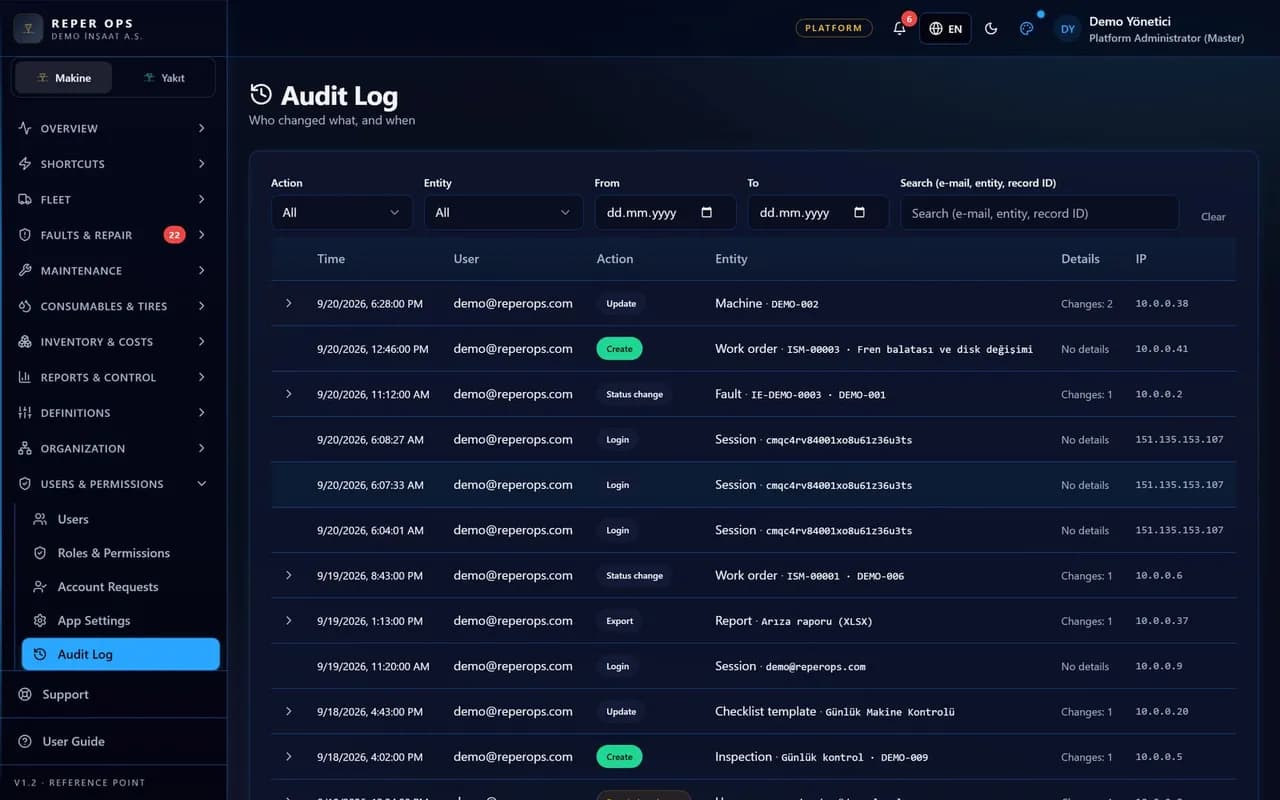

Every critical action logged
Record creation, updates, deletions and status changes are stored with the user and timestamp. The record speaks instead of the argument.

Exports are tracked too
Excel and PDF downloads are written to the audit trail. It is always known which data left the system and when.

A separate access permission
Permission to view the audit trail is granted independently of other rights. Only authorised people look at the records.

Isolated database per customer
Every customer runs in its own database; companies and projects within a group share one database, separated by permissions.
Session and access security
Traffic is encrypted with HTTPS and password resets use an email code. Sessions refresh when permissions change.
How it works
- 1
Grant the permission
Give audit trail access only to the roles responsible for it.
- 2
Actions are recorded
As users work, records, changes and downloads are tracked.
- 3
Review the history
Filter by user, date and record, then export the result.
What the audit trail records
Every significant action in the system is written to the audit trail with who did it, when and against which record. The action types are well defined: basic data operations such as create, update and delete; status transitions on records like faults and work orders; sign-ins and failed sign-in attempts; Excel and PDF exports; and role and permission changes. Changes on the Settings page such as approval mode, currency and planned hours land in the same trail.
Records cannot be edited or deleted by users. They are kept for 180 days, after which older entries are removed by automatic housekeeping.
What the manager sees
The Audit Trail page in the Access menu shows a table of user, timestamp, record type, action and IP address. The list is narrowed with user, record type and date range filters, and clicking a row opens a field-level comparison of old and new values. Reviewing failed sign-in records regularly helps spot suspicious access attempts early. The filtered list can be taken as an Excel or PDF report.
The history of a single record
You can also review a record's history without going to the audit trail. The History tab on a machine, work order or fault detail page lists only the changes to that record in chronological order, and clicking a row reveals the field details. This tab is also governed by the View Audit Trail permission. Meter corrections, downtime edits and fault status transitions are all read here with who and when.
Security foundations and who it suits
Permission to view the audit trail is granted independently of other rights, so only authorised roles see the records. Every customer runs in their own isolated database and data is never mixed with other companies; backups are taken daily and held in a European data centre. Traffic is encrypted with HTTPS, password resets use an email code, and sessions refresh when permissions change.
The audit trail works like a shadow of the other modules: closing a fault, approving a work order, moving stock, updating a contract, downloading a report or editing a role all happen in their own module while the trace accumulates here. Instead of asking why a record changed, you look at its history; the record speaks instead of the argument. It suits IT, company administrators and finance teams who must present evidence of changes during internal or customer audits.
FAQ
How long are the records kept
Audit trail records are kept for 180 days and can be filtered and reported within that period. The report can be taken as Excel or PDF.
Does a deleted record leave a trace
Yes. Deletion is also written to the audit trail with the user and timestamp. You can see retrospectively what state the record was in before it was deleted.


Ready to digitize your equipment fleet?
Take the first step toward a more efficient, more controlled and more profitable operation.