
Weighbridge Software: Tickets, Tonnage, Haulage and Purchase Cost Control
Every weighing on record, every tonne in the cost
On an earthworks, quarry, ready-mix or asphalt site, or a road project, the weigh ticket is the basis for tonnage, the haulier's statement and the material purchase. If your weighbridge software or integrator sends tickets, a ticket is recorded instantly through the API; if it does not, it is imported with Excel or CSV. If neither is available, two weighings, or one weighing against a stored tare, are entered through a web form. The ticket is converted into haulage and purchase cost and linked to the project; the haulage amount flows into project cost. Tare deviation, a second weighing of the same plate within a short time and tickets left open show up as alerts.
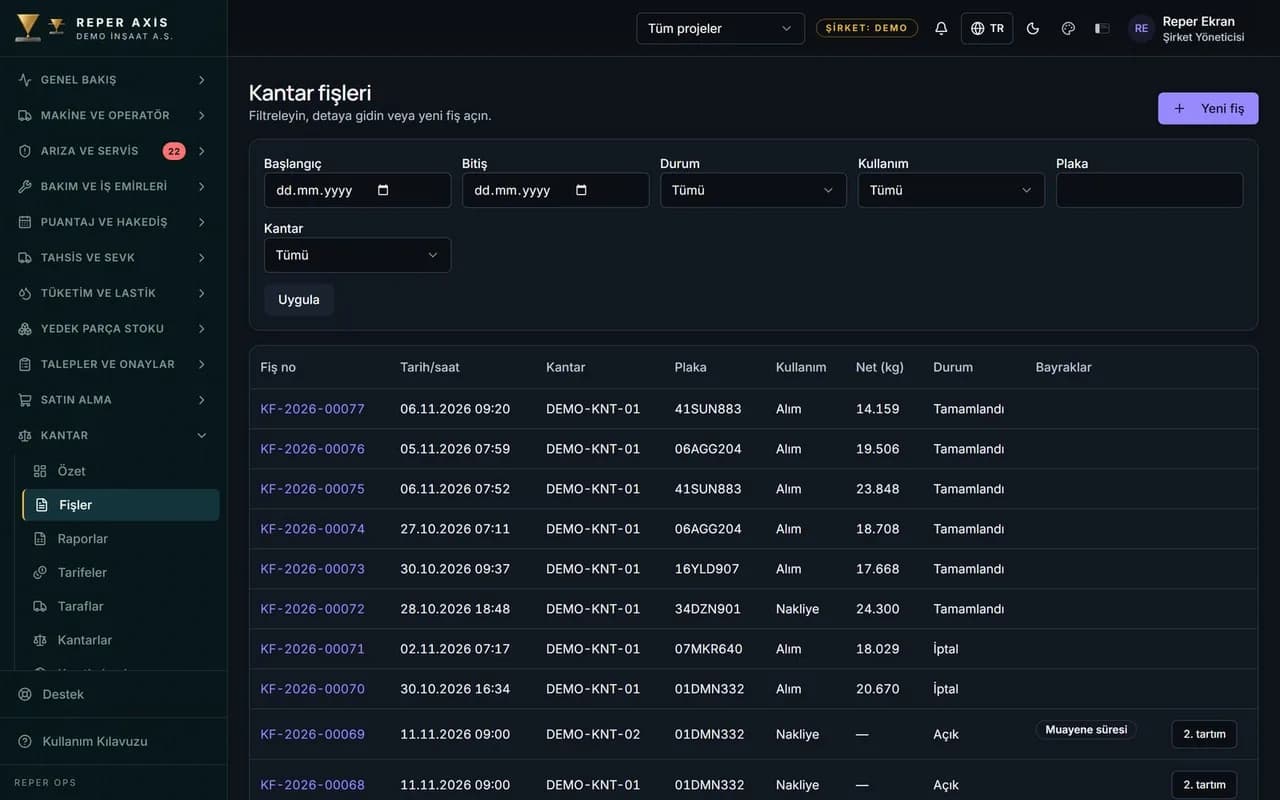
What you can do

Instantly via API if your weighbridge software sends tickets
The weighbridge software or its integrator sends tickets with an API key and the ticket is recorded instantly. Even if the same ticket is sent again, no second record is created.

Excel or CSV if it does not send
The ticket export of a weighbridge system that sends no API data is uploaded as a file. The column mapping is saved per weighbridge; a row-by-row result and a list of faulty rows are shown, and the same ticket is never written twice.

Haulage and purchase cost
Haulage cost is calculated from the haulier's tariff per tonne, per trip or per tonne·km. For purchases, the unit price of the purchase order line is multiplied by the weighbridge net weight; without an order, the purchase tariff is used.

Flow into cost and reports
The haulage amount is posted to project cost as a haulage item; the Cost module is required. Daily summary, material, haulier statement, purchase and sales reports are downloaded as Excel.

Suspicious weighing alerts
A ticket is flagged if the tare deviates noticeably from the stored tare, if the same plate is weighed again within a short time, if a ticket stays open for more than 12 hours or if the weighbridge's verification has expired.

Manual entry fallback
At a weighbridge that sends no tickets, the web form is used: with two weighings, or with one weighing against the stored tare. Corrections are made with a reason, and the old values stay in the revision history.
How it works
- 1
Define the weighbridge
The weighbridge is added with its project, capacity and verification expiry; haulier, supplier and customer are recorded as parties.
- 2
Connect the tickets
Your weighbridge software sends them through the API; if it does not, Excel or CSV is uploaded; if neither exists, the web form is used.
- 3
Match with tariffs and orders
Haulage and purchase tariffs are entered; a purchase ticket is linked to a purchase order line.
- 4
Follow alerts and cost
Flagged tickets are reviewed, the haulage amount flows into project cost, and reports are downloaded as Excel.
Where the weigh ticket comes from
The first route is the weighbridge software or integrator sending tickets through the API. An API key is defined; the ticket arrives with its number from the source software. If the same number is sent a second time, no new ticket is created; the second weighing and completion update the same ticket. On the Weighbridges page you see each weighbridge's source mode, connection status and last signal.
The second route is a file. The ticket export of a weighbridge system that sends no API data is uploaded as Excel or CSV. The column mapping for the weighbridge is saved once; the file is previewed and processed after approval, and the row-by-row result and faulty rows are listed. The same ticket number is not written again in a second upload. A faulty row is corrected and retried, or ignored.
What the ticket merges with, which decision comes out
The ticket is linked to the project, the party and the tariff. Haulage cost is calculated from the haulier's tariff per tonne, per trip or per tonne·km; for tonne·km the distance is taken from the ticket, or from the tariff's default distance if the ticket has none. For a purchase, the amount is the unit price of the purchase order line multiplied by the weighbridge net weight converted to the order unit; without an order, the supplier's purchase tariff is used. On a sale leaving the site, the customer tariff applies. Moisture and contract deduction are separate fields; the payable net applies both.
The amount is recorded with the tariff of that day when the ticket is completed. If the tariff changes later, past tickets do not change by themselves; an authorised person reprices them by selecting a date range. A ticket with a missing tariff or distance is flagged. The haulage amount is posted to project cost as a haulage item; the Cost module is required for this. Purchase and sales amounts stay in the weighbridge reports. Daily summary, material, haulier statement, purchase, sales, plate and anomaly reports are downloaded as Excel. Only a user with permission to view costs sees the amounts.
How a ticket progresses at the weighbridge, how data quality is protected
A ticket is open, completed or cancelled. The first weighing opens the ticket, the second closes it; gross, tare and net come from these. The weighbridge summary screen shows open tickets, those open for more than 12 hours, flagged tickets of the last seven days, unresolved import errors and today's trips by usage type.
A suspicious record is flagged by itself: net is zero or negative, gross exceeds the weighbridge capacity, the measured tare deviates noticeably from the stored tare, the same plate has been weighed again within a short time, on a purchase the weighbridge net does not match the waybill quantity, the stored tare is stale, or the weighbridge's verification has expired. Flags set apart the records to be reviewed.
A ticket is not deleted but cancelled; a reason is written for the cancellation. A correction on a completed ticket is made with a reason; the old values, the person and the reason stay in the revision history. A manual change to a ticket that came from the source is marked; an update that arrives from the source afterwards does not overwrite the manual correction, and the fact that it was not applied appears in the history.
Manual entry fallback and who it suits
If the weighbridge software sends no tickets and a file cannot be exported either, the ticket is entered through the web form. Weighbridge, direction, usage type, plate, trailer, driver, party, material, waybill, and origin and destination are entered; from the plate, the haulier and driver of the previous ticket are suggested. With two weighings, the first opens the ticket and the second closes it; with one weighing the stored tare is used and the ticket is completed. The stored tare is kept per tractor and trailer combination. The ticket is printed with signature fields for the weighbridge operator and the driver.
It suits jobs with many weighbridges and many hauliers, such as an earthworks site, a quarry and crusher, a ready-mix or asphalt plant, and road construction: the haulier statement comes from the tonnage, the purchase amount from the order, the sale from the tariff, and all of it sits in the same ticket record. The weighbridge is a separately licensed module; we clarify its scope and the connection route together in a technical discovery.
FAQ
Does our weighbridge software send tickets, and how do I find out
The company that supplies your weighbridge software, or your integrator, can tell you. If it can send tickets through the API, they are recorded instantly and a ticket sent again does not create a duplicate. If it cannot, the ticket export is uploaded with Excel or CSV. Which route fits is settled in a technical discovery.
Is a manually corrected ticket overwritten by an update from the source
No. A manual change to a ticket that came from the source is marked. An update that arrives from the source afterwards does not overwrite the manual correction; the update that was not applied shows in the revision history.
Can a wrong ticket be deleted
No, it is cancelled. A reason is written for the cancellation. A correction on a completed ticket is also made with a reason; the old values, the person who made the change and the reason stay in the revision history.
Is a ticket from a weighbridge whose verification has expired still recorded
Yes, the ticket is recorded but gets a verification-expired flag. That way tickets from a weighbridge whose validity has ended appear separately in the list and are reviewed.
Related guides
Buy or Rent Construction Equipment? The Break-Even Calculation
Whether to buy or rent a machine depends on how many hours it will work in a year. This guide puts ownership cost and rental cost in one table and finds the break-even hours with a worked example.
Excavator and Loader Fuel Consumption Comparison: A Fair Benchmark
Comparing excavator and loader fuel consumption in litres per hour can mislead even for the same machine. This guide explains the normalization steps for a fair comparison and the L/m³ and L/tonne calculation with example tables.
Moving from Excel to Spare Parts Inventory Software: Data, Templates and Cutover Day
An Excel list does the job for years; then two people open the same file in different versions and nobody holds the stock. The real work of the switch is making the data loadable.


A 15-day pilot with your own fleet
The pilot is free and runs with up to 10 machines. Send us your machine list and we load it into the system. Fault, maintenance and timesheet are on; the timesheet is a separately priced module in the annual licence. You work in an account set up for your company. Nothing is charged automatically.