What QR code machine tracking is
QR code machine tracking ties field transactions to the right machine through a unique code stuck on each one. The operator scans the label with a phone camera; the machine is already selected on the screen that opens, and reporting a fault, filling in a checklist or entering a meter takes a few taps.
In field tracking run on paper forms and chat groups, the two commonest errors are records attached to the wrong machine and records never made at all. The code removes the first structurally and reduces the second by making the transaction easy.
Labels: preparation, placement and durability
The label carries a link pointing to the machine's record; the code is generated and printed as soon as the machine is entered. Printing the machine code and a short description alongside it makes manual lookup easy when the camera will not read.
Site conditions are hard on labels: dust, mud, oil, sunlight and pressure washing. Laminated vinyl or metal is the sensible choice, as paper becomes unreadable within weeks. The inside of the cab door or the side of the engine cover are easy to reach and protected from impact. Two labels, one inside and one outside, remove reading problems almost entirely.
Scanning and working without an app
Modern phone cameras recognise the code directly, so no reader app is needed. The link opens in the browser, the user signs in once and the session is remembered on later scans. App store downloads, updates and device compatibility problems disappear with it.
Being signed in brings two benefits: the person making the transaction is written into the record automatically, and each user sees only what they are authorised for. The operator reports faults and enters fuel while the maintenance supervisor opens history and documents from the same screen. Transactions made outside the registered site can raise a location mismatch alert.
Field flows: faults, inspections, fuel and meters
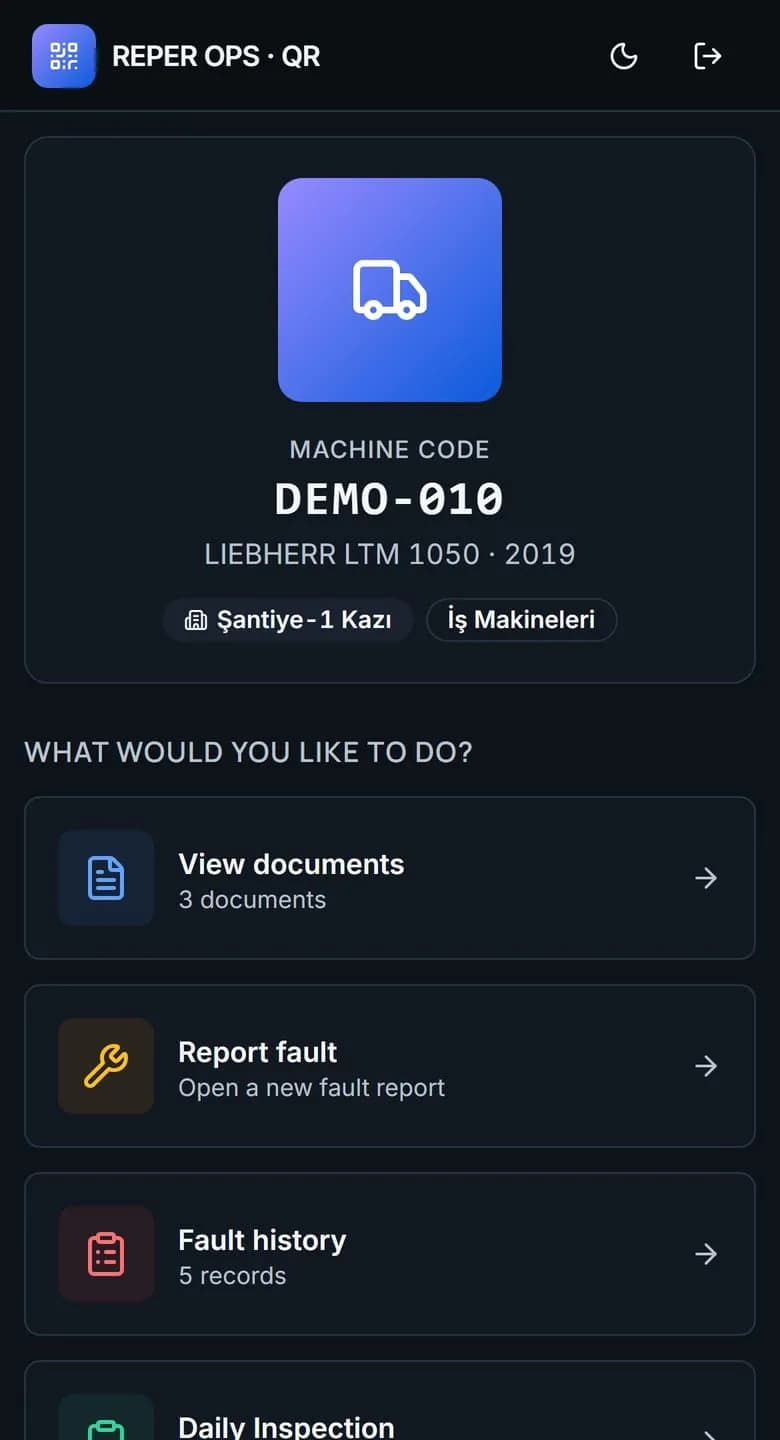
The machine screen that opens after a scan presents the transactions used most often in the field as a single list. Every flow starts with the machine already selected and is completed with the fewest possible fields.
- Report a fault: category, priority, operable status and a photo. Not operable starts the downtime record.
- Fill in a checklist: the shift start list for the machine group opens and a failed critical item raises a fault.
- Record a refuelling: litres, meter reading and tank selection, with the tank level updating immediately.
- Enter a meter reading: operating hours or mileage, which drive maintenance triggers and consumption figures.
- View fault history: what happened before is read on the spot, so recurring problems get noticed.
- View documents: registration, insurance and inspection certificates open instantly during a site audit.
- Check tyre status: configuration, fitment and last tread depth, visible standing next to the machine.
The offline queue: what happens with no connectivity
Some sites have no coverage or lose it intermittently, so the record has to be captured without waiting for a connection. The offline queue does that: the operator enters the fault, meter, inspection or fuel record, it is stored on the device, pending records are shown on screen, and they are sent once the phone reaches the network.
The queue has two requirements. Sequence: records must be sent in the order they were entered so meter values and status transitions stay consistent. Duplicate protection: if the connection drops mid send and the attempt repeats, the same fault must not be created twice.
The who and when trail
Every record opened through a scan is matched to the signed in user and carries a timestamp, so it is clear on whose shift a fault was reported, who completed an inspection and who issued the fuel. Combined with operator assignment history, it also shows who was running the machine at the time.
The trail exists to correct the process, not to find someone to blame. A low inspection completion rate points to a training need; a meter gap that always appears at the same hour points to a shift routine problem. Later edits are written to the audit trail too: a past reading is corrected, never deleted.
How Reper Axis does this
In Reper Axis the QR label for every machine is generated from the machine card. The operator scans it with a phone camera and, on the screen that opens in the browser, reports faults, fills in checklists, records refuelling and meter readings and views history, documents and tyre status, with no app to install. A failed critical inspection item raises a fault automatically. Without connectivity, records are queued on the device and sent in order once the connection returns, never twice, and every change is stored in the audit trail.