Answering four questions at the same time
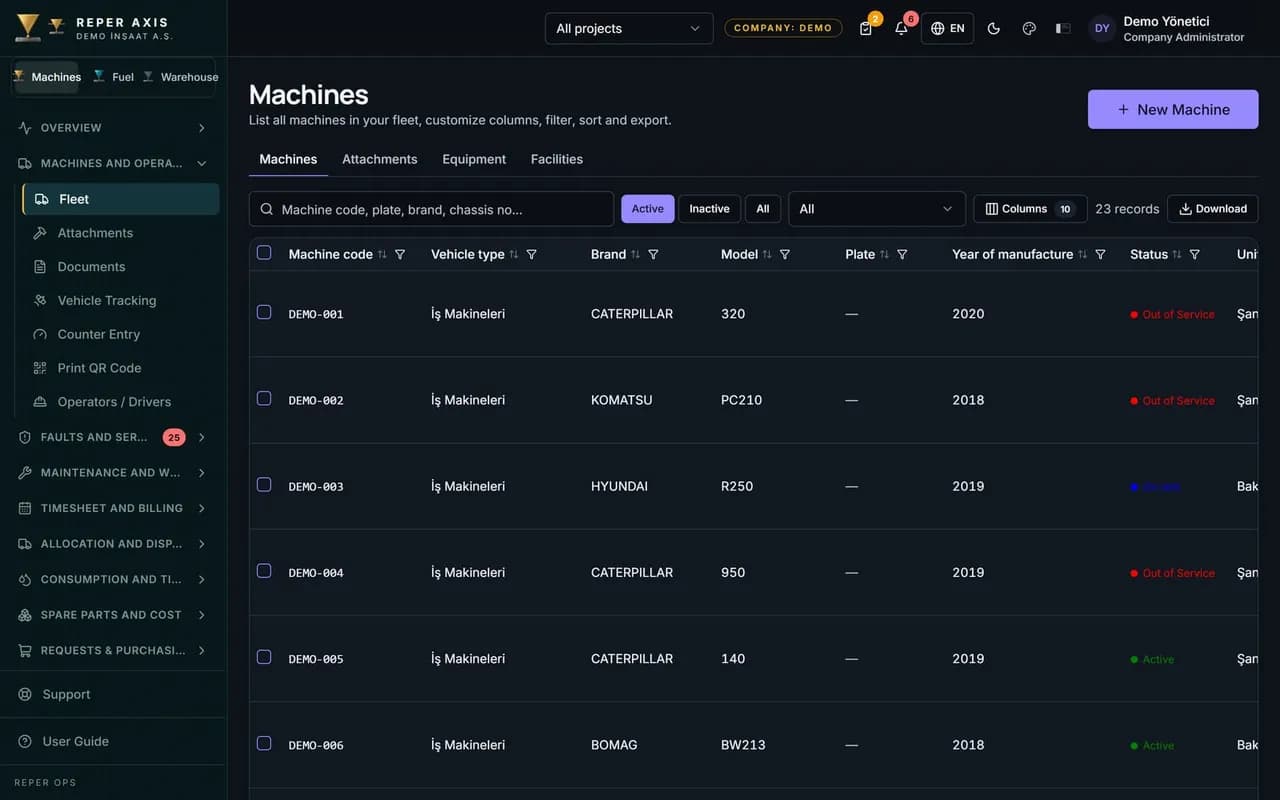
Managing machines across several sites means answering four questions for each machine at once, and by date. Which project and location is it in now? Which company owns it? Who actually operates it? Whose account is its cost written to? All four need separate records. A single site field cannot hold them.
The trouble starts when a machine changes site. The fuel, maintenance and rental cost of an excavator moved in mid-month must be split between two projects. A month in which a group company's machine works with a subcontractor's operator must also be traceable.
Four separate items on the machine card
The card and the list keep four pieces of information independent of each other. That way, a change of operator without a change of owner, or a change of project without a change of operator, does not get mixed up in one record.
- Project and location: where the machine is now. You can select several machines and move them to a new location in one go with assign location.
- Owner company: the company that owns the machine or is tied to it by contract.
- Operating company: the company that actually operates the machine. The company you select must be on the machine's project as host, participant or subcontractor.
- Company history: which company operated it in which date range, and the source of the change, shown on a card in the machine detail.
The order for setting up the structure
The order below is the shortest way to build a multi-company structure consistently. Skipping a step means corrections later.
- Define the companies with their parent company relations. The types are holding, company, joint venture and subcontractor.
- Link every project to a host company.
- On the projects screen, add the other companies that will work on the project in the participating companies field, and choose each one's role as participant or subcontractor.
- In the machine form, fill in the owner company and the operating company separately. For bulk entry, use the owner company column in the Excel import.
- If you need a higher structure such as a regional office or a line of business, build it with project groups.
Where cost is written when a machine changes site
Cost is written to the project the machine was in on that date, not to where it is at month end. For example, in a 30-day month an excavator starts at site A and moves to site B on day 12. Records for days 1 to 11 fall to A, and records for days 12 to 30 fall to B. That is 11 days for A and 19 days for B. Fuel cost goes to the project on the refuelling date. Fault and work order cost goes to the project on the date it was closed. An internal labour line goes to the project of the day worked. A fault opened at A and closed at B therefore shows its amount at B.
Rent follows the same date rule but is split by calendar days. If the monthly rent in the same example is €4,500, the cost module writes the 11-day share (€1,650) to project A and the 19-day share (€2,850), including the transfer day, to project B. The timesheet and cost report screen in the Machine Timesheet and Rental Billing module instead spreads rent by the weight of the days worked on the approved timesheet. If the machine stood idle at site B for a few days, the project shares on the two screens will not match exactly. State in the report which calculation was used.
There are two limits on a change of company. You cannot make a retroactive change to a date before the start of the open assignment, and if the timesheet day for that date is locked, the system rejects the change. An approved timesheet day is written to the company that operated the machine on that date. For the move itself, see the guide to planning transport between sites.
An internal hire charge between companies is outside the scope of these records. If the owner company invoices the operating company for the machine, that calculation is kept on the accounting or ERP side.
A subcontractor's machine: visible, but ownership stays clear
If a subcontractor's machine works on the project, two things are clear in the record. The owner of the machine is the subcontractor company, and its role on the project is defined as subcontractor. The machine appears in the same list as the main company's machines, but it is set apart by the owner company and operating company columns. If you turn the filter to the operating company, only the subcontractor's machines remain.
For example, on a site with 14 machines, 3 belong to a subcontractor. At the weekly fault meeting the list of 14 machines reads on one screen. The faults and maintenance delays of the subcontractor's machines can be filtered out and shared with the subcontractor. The scope given to the subcontractor's own users is set separately, and they see only the records in that scope.
The checking order for a mid-month site change
When a machine changes site in mid-month, four records must fall on the same day. If one is left behind, cost or timesheet lands on the wrong project.
- Open the transfer window in the machine detail and select the new project, the location and, if needed, the operating company. If the machine moves through a dispatch, the unloading record also updates the operating company.
- Enter the meter value on the day of transport. The difference between it and the value on the first day at the new site should be explainable.
- Do not choose a date in a locked month. If a retroactive change falls on a locked timesheet day, the system rejects it.
- The maintenance programme moves with the machine. Check that the foreman at the new site can see the machine on the maintenance panel.
Head office and site: who does what
The standard roles come defined together with their scopes. The summary below is based on the default templates and can be changed person by person.
- Company Administrator: manages all of the company's projects and the data under them. Cannot create companies.
- Regional Manager: runs operations of the projects in a project group and sees cost. Can only view faults.
- Project Manager: holds the authority of a single project. Does not approve fault or maintenance work orders.
- Site Manager: operations on site, timesheet approval, dispatch and accidents. No user or definition management.
- Machine Supervisor, Workshop Supervisor and Foreman: approval of fault and maintenance work orders ends on this line.
Seeing is not the same authority as writing
Company scope lets a user see subsidiary companies, but write authority stays per project. A subsidiary user only sees a machine on the main company's project unless project scope is given. This split makes subcontractor machines visible while preventing anyone else from changing their records.
On the permissions tab of the person screen, the where do they work section defines places one by one, and each place has its own authority. Authority given in one place does not carry over to another. For example, a foreman can manage fault records at site A and be only a viewer at site B. The permission preview shows what actions the person can take in a chosen project context.
Head office's weekly view
Head office wants to see the sites side by side on the same measure. Project comparison on the reports page compares projects by working hours, availability, faults, maintenance, fuel and cost indicators. The availability and downtime report shows downtime machine by machine. The reports that come with the Machine Timesheet and Cost modules have a company filter and column, so you can read by operating company.
Go to the meeting with three questions. Which site has high downtime for its number of machines? Which company's machines have carried maintenance delay for two months? Is the cost of machines that changed site during the month split by date? Reper Axis produces these three answers from the same chain of records.