Four ways to read working hours
There are four ways to follow working hours remotely. A device reads the engine control unit over the CAN bus. A GPS device sends one report a day. Data is pulled from the server of the manufacturer or the telematics provider. Or someone on site types in a value by hand. Instead of asking which one is correct, ask how old a number each one gives you. For a maintenance due date, what matters is that the delay stays smaller than your warning threshold.
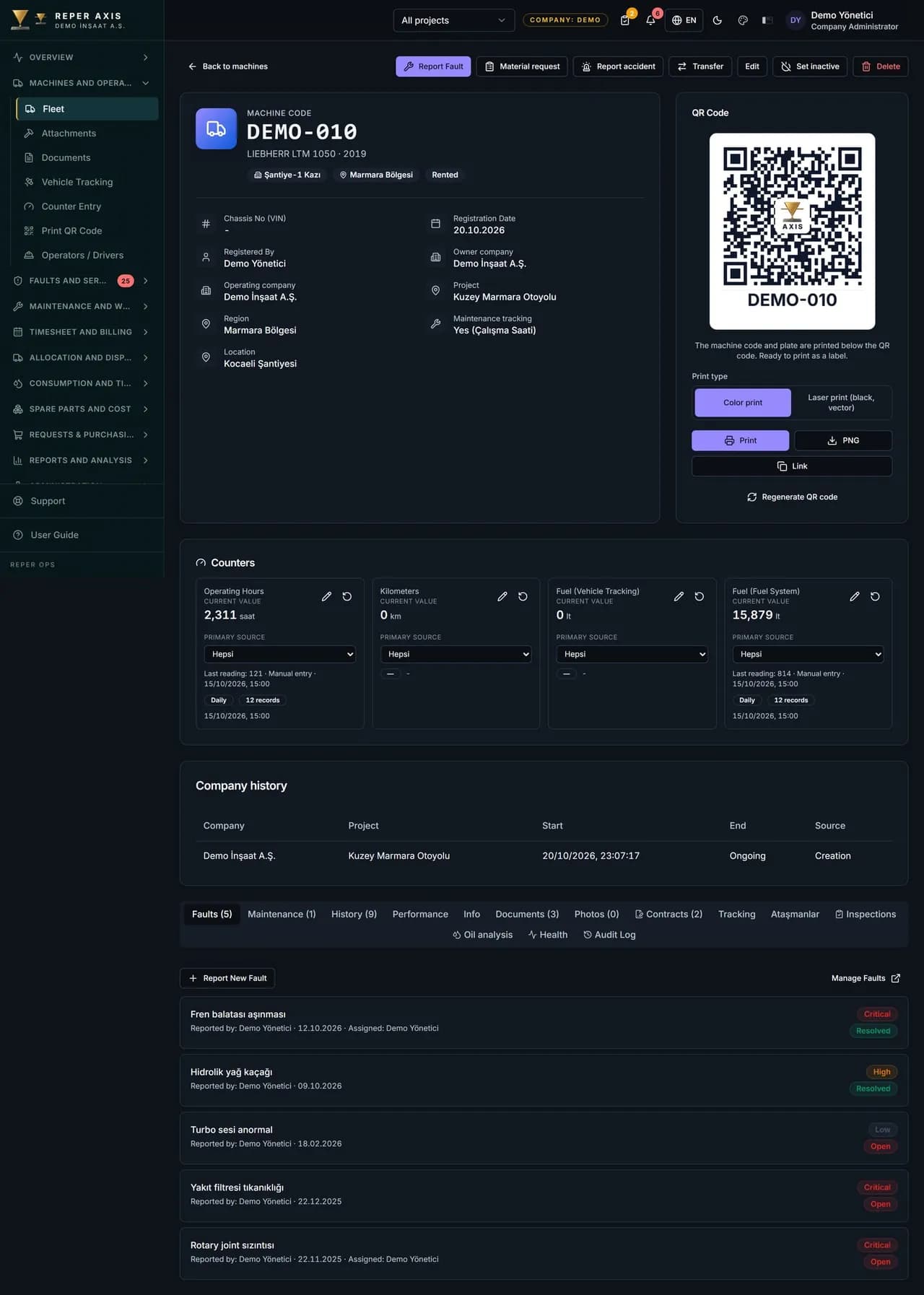
All four usually run side by side in one fleet. A new excavator may report through the manufacturer's data, a mid-age loader through a CAN device, and an old roller only through a value entered by QR code. The last reading line on the meters tab of the machine shows through which channel and when the value arrived. That is where you read how far to trust a number in the list.
ISO 15143-3, named in the third way, is not a method of reading. It is a data exchange schema. The standard defines the communication between the server of a telematics provider or manufacturer and the customer's application. It does not cover collecting data from the CAN bus on the machine, or sending that data from the device to the provider's server. Those two links belong to the provider. The official scope is given on the ISO 15143-3 page on the ISO website.
The four sources side by side
Three properties decide the outcome for a maintenance plan: what the source reads, how late it arrives and where it fails. The lines below put these three side by side for each source.
- Machine electronics (CAN bus): a device that reads the machine's own total hours. In the current integration, a device with a CAN bus writes the cumulative meter, which is the total hours of the engine controller. Data arrives at the collection interval. The default is 6 hours per connection and it can be set per project between 1 and 24 hours. Where it fails: not every machine has this output, and if the cable or device is removed, the flow stops.
- GPS device: in the current integration, the daily work of a device without a CAN bus arrives the next day as a daily total and is written to that day's record. Today's work is not yet visible. Where it fails: the time the device counts may not match the engine hours exactly.
- Manufacturer data (ISO 15143-3): pulls hour data through the manufacturer's standard interface. Your company authorises the access from its own manufacturer account. The manufacturer's server decides how current the data is, and the collection interval on the Reper side is the connection setting above. Where it fails: if the machine is not registered in the manufacturer account, or the authorisation has expired, no data arrives.
- Manual entry: the operator, technician or timekeeper writes the gauge value by QR code, the mobile app or the meter entry page. The delay is the time since the last entry. Where it fails: forgetting to enter, and writing a guess without looking at the gauge.
Choosing the mode for manual entry, and bulk upload
In the new meter reading window, the mode field offers two choices. Cumulative is the total value on the gauge. Daily increment is how many hours were worked that day. Mixing them up is a common mistake. If a daily increment is typed in place of a total, the machine's hours suddenly jump back by hundreds. Each entry also carries the reading date and time, so yesterday's reading can be entered today.
When you need to load past readings in one go, use the meter template in the Excel Data Import module. After the file is uploaded, the preview counts new, to be updated, skipped and faulty rows separately. Faulty rows can be downloaded as CSV and corrected. For companies moving hours from another system, the API access module does the same job through a bulk call.
If there are two sources on the same machine
If a machine has a GPS device and an operator also enters the meter by hand, the two readings can disagree. The primary source setting resolves this. By default the current value is calculated from the readings of all sources. If telemetry or manual entry is chosen for a machine and meter type, the current value comes only from that source's readings. Readings from the other channel are kept apart and labelled as not from the primary source.
The practical rule is this: on a machine where telemetry is well established, make telemetry the primary source and use manual entry only as a check. If telemetry stops, do not hide it by changing the primary source. The stale meter alert below makes the interruption visible.
When a meter is reset or a device is replaced
When a machine's gauge fails and a new one is fitted, the total hours on record must not go back to zero. The reset meter button on the meters tab asks for two values: the total at which it was reset and the new meter start. For example, the old gauge failed at 1,855 hours and the new one starts from zero, so you enter 1,855 and 0. If the new gauge now reads 40 hours, the system uses a total of 1,895 hours, and the maintenance plan and averages carry on from where they were.
Resets stay in the reset history list. You can delete one that was entered wrongly, and the total hours are recalculated. When a telemetry device is replaced, compare the value shown on the panel on the first day with the machine's own gauge. If they differ, enter the gauge value by hand in cumulative mode.
Catching a machine that sends no data
When a meter stops quietly, the maintenance plan drifts quietly. If a machine with maintenance tracking has a last reading three days old or more, it appears in the maintenance meter category on the checklist page. If there is no reading at all, or the last value is zero, the row is marked as meter not entered. The enter reading button on each row goes straight to the entry page.
The same threshold feeds the daily summary. The stale meter reading notification gives the machine code and how many days no reading has arrived. Looking at this list on Monday morning catches a machine whose telemetry has stopped, or whose operator has gone on leave, without waiting a week. The list does not look at the source, so an interrupted telemetry link and a forgotten manual entry appear on the same row.
Effect on the maintenance due date: a worked example
You set in the maintenance programme how many hours before the service the approaching warning starts. For calendar-based maintenance the same setting is entered in days. The 25 hours below are only an example. A machine works 9 hours a day on average. The warning for the 500-hour service starts 25 hours before, at 475 hours, and the panel shows 492 hours. The panel shows the machine as maintenance approaching. If the meter is entered by hand and the last entry was four days ago, the real value is about 492 + 4 × 9 = 528 hours. The service is 28 hours overdue, yet the panel still says only that it is approaching. The machine drops into the overdue list only when a new reading is entered.
Think of the delay in two separate measures: the calendar time since the last reading, and the work the machine can actually do in that time. With a GPS device, the daily total arrives the next day, so one to two days of work may be invisible. On a machine working 9 hours a day, that is 9 to 18 hours. With a CAN device the default collection interval is six hours. If the machine runs without a break between two collections, up to six hours of work is not yet on the panel. The roughly 2 hours you get by spreading 9 hours evenly over the day is only an average, not an upper limit. The general test is this: the most work the machine can do during the source's delay should be smaller than the warning threshold in the programme. For how to choose the threshold and the service levels, see the preventive maintenance plan guide.
- Manual entry, once a week: up to 7 days × 9 hours = 63 hours of work stay invisible. The 25-hour example threshold is exceeded, so daily entry or telemetry is needed.
- GPS daily report: 1 to 2 days × 9 hours = 9 to 18 hours. This stays below the 25-hour example threshold.
- CAN device, default 6-hour interval: at most 6 hours of work between two collections is invisible. If the interval is raised to 24 hours, this grows to everything the machine can do in a day, up to 9 hours in the example. It still stays below the 25-hour example threshold.
The check to run in the first two weeks
Before you trust a source, test it against the machine's own gauge. Five machines are enough, with at least one for each source.
- Photograph the gauge on the chosen machines and record it with the date.
- On the same day, write down the value on the panel and the channel on the last reading line.
- If the difference is more than a tenth of the warning threshold, question the source or the device settings.
- Set the primary source machine by machine and note any changes.
- At the end of two weeks, confirm that the maintenance meter category on the checklist page is empty.